Key Features
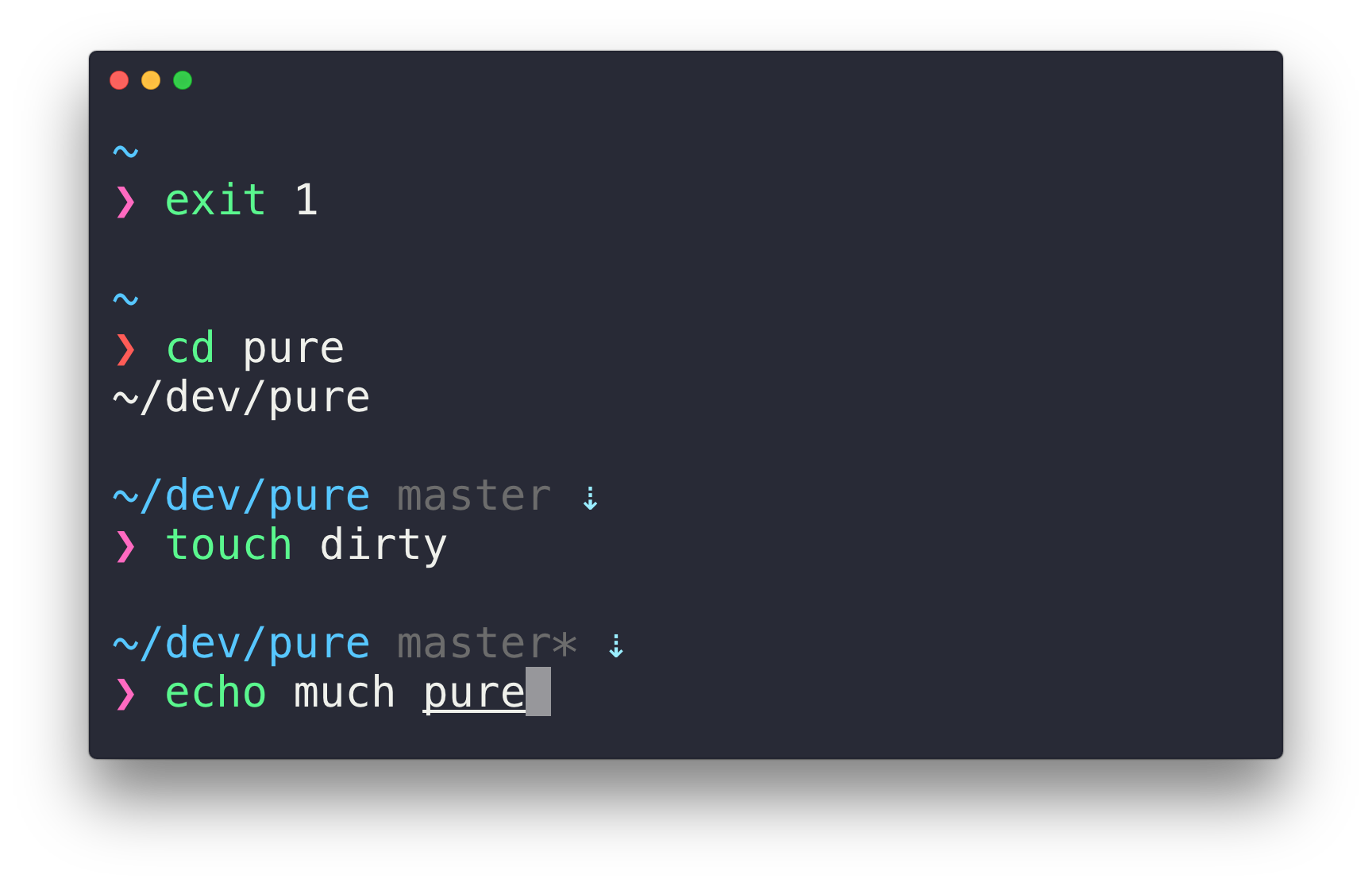
- Perfect Prompt Character: The author searched through the entire Unicode range to find the ideal prompt character (❯)
- Git Integration: Shows the current branch and indicates dirty state with an asterisk (*)
- Asynchronous Git Checks: Displays up/down arrows for unpushed/unpulled commits (checked asynchronously for better performance)
- Smart Feedback: Prompt character turns red when the last command fails (exits with non-zero status)
- Execution Time: Displays command execution time when it exceeds a configurable threshold
- Context-Aware Display: Username and host only appear when in an SSH session or container
- Title Bar Integration: Shows current path in the title and current folder & command when a process is running
- VI-Mode Support: Indicates VI-mode status with a reverse prompt symbol (requires ZSH 5.3+)
- Customizable: Serves as an excellent starting point for your own custom prompt
Requirements
- Git: Version 2.15.2 or higher
- ZSH: Version 5.2 or higher (older versions may work but are not recommended)
- Note: Cannot be installed with
yarn, must usenpmor manual installation
Installation Methods
Method 1: npm (Recommended)
The quickest way to install Pure is via npm:
npm install --global pure-prompt
After installation, skip directly to the Getting Started section.
Method 2: Homebrew
For macOS users with Homebrew:
brew install pure
Important: If you’re not using ZSH from Homebrew, you must add the site-functions to your fpath in $HOME/.zshrc:
fpath+=("$(brew --prefix)/share/zsh/site-functions")
Method 3: Manual Installation
For users who prefer manual installation:
- Clone the repository to a local directory (we’ll use
$HOME/.zsh/pure):
mkdir -p "$HOME/.zsh"
git clone https://github.com/sindresorhus/pure.git "$HOME/.zsh/pure"
- Add the cloned repo path to
$fpathin your$HOME/.zshrc:
# .zshrc
fpath+=($HOME/.zsh/pure)
Getting Started
After installation, initialize the prompt system and activate Pure by adding these lines to your $HOME/.zshrc:
# .zshrc
autoload -U promptinit; promptinit
prompt pure
Integration with Plugin Managers
oh-my-zsh
- Set
ZSH_THEME=""in your.zshrcto disable oh-my-zsh themes - Follow the Pure installation instructions above
- Do not enable incompatible plugins:
vi-mode,virtualenv
Important: oh-my-zsh overrides the prompt, so Pure must be activated after source $ZSH/oh-my-zsh.sh
Prezto
Pure is bundled with Prezto - no separate installation needed. Simply add prompt pure to your ~/.zpreztorc.
Zim
Add the following to your .zimrc and run zimfw install:
zmodule sindresorhus/pure --source async.zsh --source pure.zsh
zplug
Add these two lines to your .zshrc:
zplug mafredri/zsh-async, from:github
zplug sindresorhus/pure, use:pure.zsh, from:github, as:theme
zinit
Add these lines to your .zshrc (order matters):
zinit ice compile'(pure|async).zsh' pick'async.zsh' src'pure.zsh'
zinit light sindresorhus/pure
zi
Add this single line to your .zshrc:
zi light-mode for @sindresorhus/pure
Configuration Options
Pure can be customized through environment variables:
| Option | Description | Default |
|---|---|---|
PURE_CMD_MAX_EXEC_TIME | Maximum execution time before showing runtime on exit | 5 seconds |
PURE_GIT_PULL | Prevent Pure from checking if Git remote has updates | 1 |
PURE_GIT_UNTRACKED_DIRTY | Exclude untracked files from dirtiness check (useful for large repos) | 1 |
PURE_GIT_DELAY_DIRTY_CHECK | Delay in seconds for git dirty checking when git status takes >5s | 1800 seconds |
PURE_PROMPT_SYMBOL | Defines the prompt symbol | ❯ |
PURE_PROMPT_VICMD_SYMBOL | Prompt symbol for VI-mode | ❮ |
PURE_SUSPENDED_JOBS_SYMBOL | Symbol for background jobs | ✦ |
PURE_GIT_DOWN_ARROW | Git down arrow symbol | ⇣ |
PURE_GIT_UP_ARROW | Git up arrow symbol | ⇡ |
PURE_GIT_STASH_SYMBOL | Git stash symbol | ≡ |
Advanced Configuration with zstyle
Enable Git Stash Status
Git stash status is not shown by default. To enable it:
zstyle :prompt:pure:git:stash show yes
Optimize Git Fetch
Only fetch the upstream branch of the current local branch (can provide faster updates but disabled by default):
zstyle :prompt:pure:git:fetch only_upstream yes
Nix-Shell Integration
nix-shell integration is enabled by default. To disable it:
zstyle :prompt:pure:environment:nix-shell show no
Color Customization
Color Format Options
Pure supports three color format types:
- Decimal Integer: Corresponding to your terminal’s color index (for
xterm-256color, see the color chart) - Named Colors:
black,red,green,yellow,blue,magenta,cyan,white,default - RGB Hex: Format
#424242(requires 24-bit color support orzsh/nearcolormodule)

Available Color Elements
Colors are modified using zstyle with the pattern :prompt:pure:$color_name:
execution_time(yellow) - Command execution time displaygit:arrow(cyan) - Git up/down arrowsgit:stash(cyan) - Git stash symbolgit:branch(242) - Current branch namegit:branch:cached(red) - Branch name when data isn’t freshgit:action(yellow) - Current Git action (rebase, cherry-pick, etc.)git:dirty(218) - Asterisk indicating dirty branchhost(242) - Hostname on remote machinespath(blue) - Current path (PWD)prompt:error(red) - Prompt symbol on command failureprompt:success(magenta) - Prompt symbol on command successprompt:continuation(242) - Parser state in continuation prompt (PS2)suspended_jobs(red) - Suspended jobs symboluser(242) - Username on remote machineuser:root(default) - Username when user is rootvirtualenv(242) - Python virtualenv name
Color Layout
┌────────────────────────────────────────────────────── user
│ ┌─────────────────────────────────────────────── host
│ │ ┌─────────────────────────────────── path
│ │ │ ┌──────────────────────── git:branch
│ │ │ │ ┌────────────────── git:dirty
│ │ │ │ │ ┌──────────────── git:action
│ │ │ │ │ │ ┌─────── git:arrow
│ │ │ │ │ │ │ ┌───── git:stash
│ │ │ │ │ │ │ │ ┌─── execution_time
│ │ │ │ │ │ │ │ │
zaphod@heartofgold ~/dev/pure master* rebase-i ⇡ ≡ 42s
venv ❯
│ │
│ └───────────────────────────────────────────────── prompt
└────────────────────────────────────────────────────── virtualenv
Using RGB Colors
For true RGB colors, use a terminal with 24-bit color support. For terminals without this feature, use the zsh/nearcolor module:
# .zshrc
zmodload zsh/nearcolor
zstyle :prompt:pure:path color '#FF0000'
Note: The zsh/nearcolor module maps hex colors to the nearest color in the 88 or 256 color palette, avoiding the first 16 colors.
Example Configuration
Here’s a complete example .zshrc configuration:
# .zshrc
autoload -U promptinit; promptinit

# Optional: Load nearcolor for RGB hex support
zmodload zsh/nearcolor

# Configure options
PURE_CMD_MAX_EXEC_TIME=10

# Customize colors
zstyle :prompt:pure:path color white
zstyle ':prompt:pure:prompt:*' color cyan

# Enable git stash status
zstyle :prompt:pure:git:stash show yes

# Activate Pure
prompt pure
Visual Tips
- Terminal: Pure looks great in Hyper with the hyper-snazzy theme and Menlo font
- Alternative Theme: Tomorrow Night Eighties with Droid Sans Mono (15pt) is also recommended
- Anti-aliasing: Ensure anti-aliasing is enabled in your terminal for best results
- Syntax Highlighting: Install zsh-syntax-highlighting for colorized commands
Pure-Inspired Alternatives
ZSH Variants
- purity - More compact current directory with extra Git indicators
- pure (intelfx) - Solarized-friendly colors with verbose, fully async Git
- pure (forivall) - Highlights Git repo root directory in path
- purer - Compact single-line prompt with built-in Vim-mode indicator
- pure-now - Fork with Now.sh support
- pure10k - Powerlevel10k configuration that mimics Pure
Other Shells
- Bash: sapegin/dotfiles prompt
- Fish: pure-fish/pure (fully tested port)
- Rust: purs (Pure-inspired prompt in Rust)
- Go: mimir (with Kubernetes and OpenStack support)
- PowerShell: pure-pwsh (Pure for PowerShell/PS Core)
Credits
Created by Sindre Sorhus with contributions from Mathias Fredriksson and the open-source community.