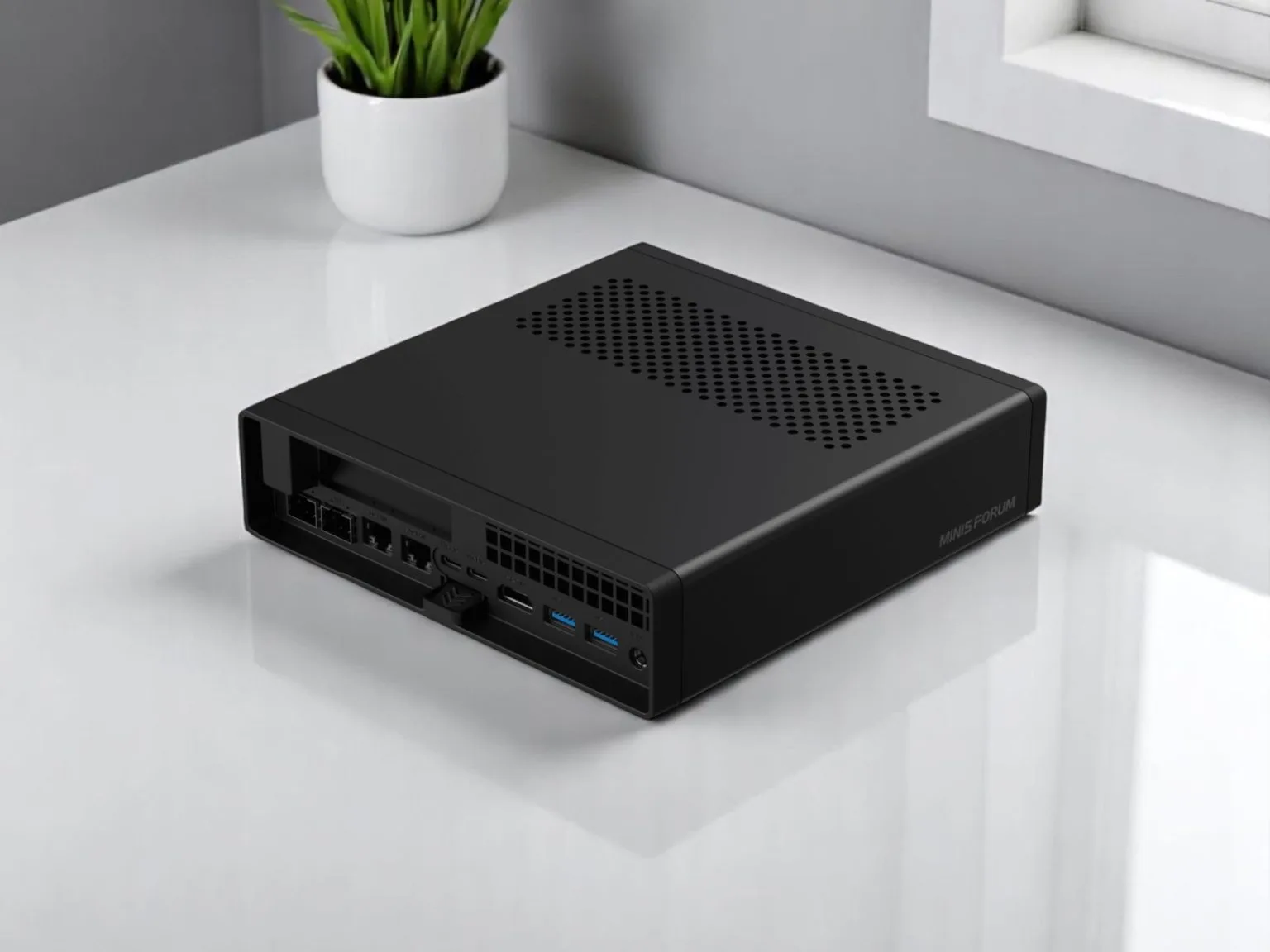
I bought a Minisforum MS-A2, lived with it for months, modified most of it, pushed it harder than most people will, and then sold it. This review is the long answer to why, and it isn’t a clean recommendation either way. The MS-A2 is one of the most impressive small machines you can buy. It’s also one I’d never put on my desk or in my living room. I’ll explain how both of those are true.
Wherever I could, I checked my own results against the people who measure this stuff properly: ServeTheHome, NASCompares, Notebookcheck, NoobFeed, and a pile of homelab forum threads from people running these in production. Where my experience and their numbers agree is where you should trust what follows. They agree almost everywhere, including on the failures I’d written off as my own bad luck.
What the MS-A2 actually is
For something the size of a hardback novel, the spec sheet is almost silly. A desktop-class 16-core CPU lives inside 1.78 liters.
| Component | Specification |
|---|---|
| CPU options | AMD Ryzen 9 9955HX (Zen 5) or Ryzen 9 7945HX (Zen 4) — both 16C/32T, up to 5.4 GHz; later 8945HX/7745HX options added |
| iGPU | Radeon 610M — display output only, not a compute GPU |
| Memory | 2× DDR5 SO-DIMM, officially up to 96 GB (5600 MT/s on 9000-series, 5200 on 7000-series); 128 GB works unofficially; no ECC support |
| Storage | 3× M.2 slots, all PCIe 4.0 x4-capable (secondary slots default to Gen3 in BIOS); one also takes U.2 / 22110 enterprise drives up to 15 TB |
| Expansion | Physical PCIe x16 slot wired as PCIe 4.0 x8, bifurcatable to 2× x4 |
| Networking | 2× 10GbE SFP+ (Intel X710), 2× 2.5GbE (Intel i226-V + Realtek RTL8125), Wi-Fi 6E + Bluetooth (MediaTek RZ616) |
| Display | HDMI 2.1 (8K60) + 2× USB-C with DisplayPort Alt Mode 2.0; triple-display capable. No Thunderbolt / USB4 |
| Power | External 240 W brick (19V DC-in) |
| Chassis | 196 × 189 × 48 mm, ~1.4 kg, precision aluminum, tool-less slide-out top |
| Price | Barebones ~$799 (9955HX) / ~$559 (7945HX); configured $1,199–$1,919; EU from ~€839. Soldered BGA CPU, not upgradeable |
| Warranty | 3-year factory warranty |
My unit had the Ryzen 9 9955HX, AMD’s Zen 5 “Fire Range” part. It’s basically the desktop Granite Ridge silicon in a mobile package, and it behaves like it.
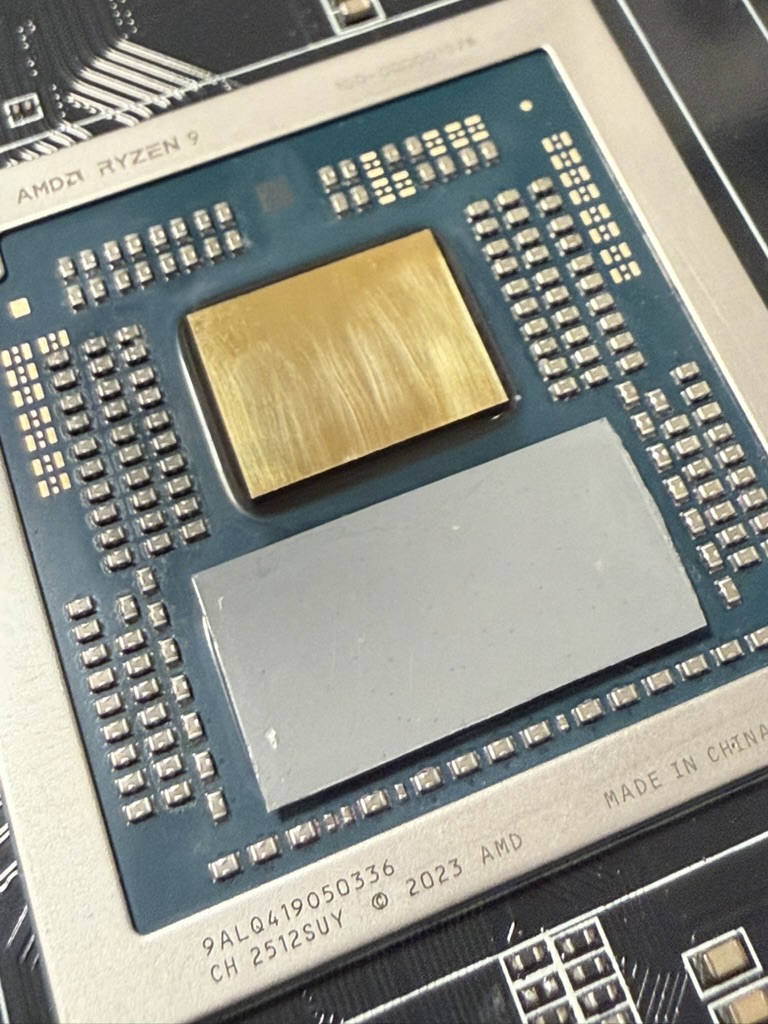
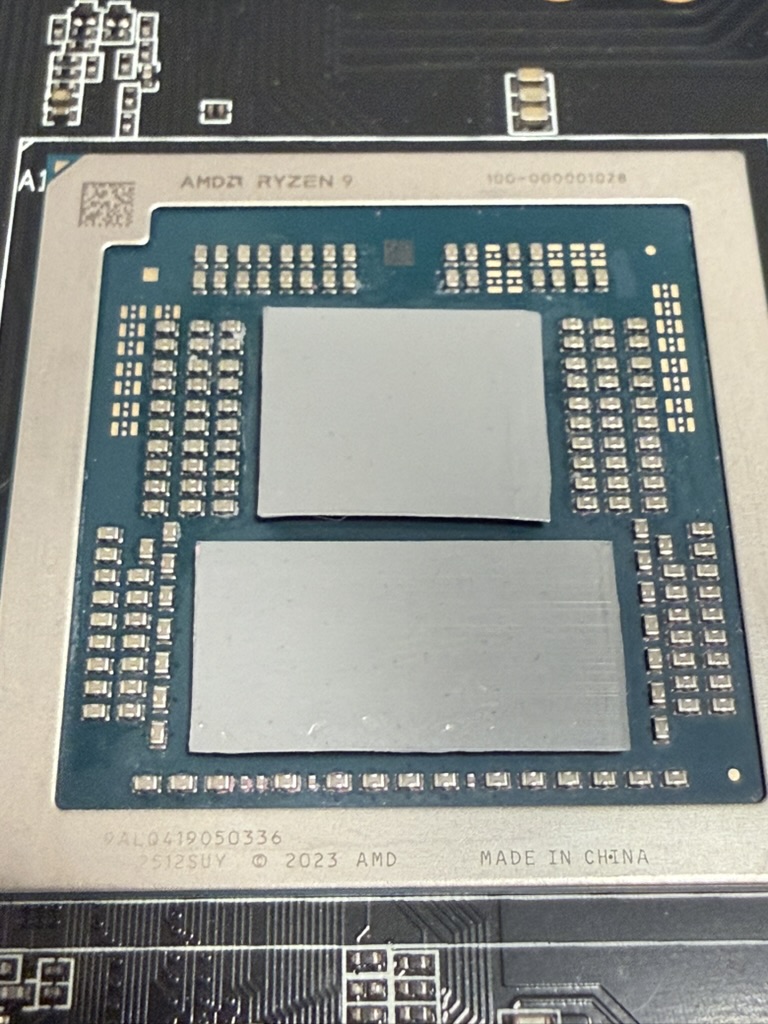
A few things to know before you buy. The CPU is soldered. The older MS-A1 used a socketed AM5 platform; this one ships a BGA mobile chip you can’t ever change. It also drops the Thunderbolt and USB4 the Intel MS-01 had, trading them for USB-C with DisplayPort Alt Mode, which stings if you wanted Thunderbolt networking in a cluster. On the plus side, the 10GbE runs on an Intel X710. That’s a well-supported enterprise NIC and good news for ESXi or Proxmox, with one Linux caveat I’ll come to later.
Build quality and serviceability
I have nothing bad to say here. The aluminum chassis feels far more expensive than the price, and the tool-less lid is the standout: press the button, slide the top off, and you’re looking at the internals in about three seconds. Minisforum won a design award for it and earned it. I did every mod in this review without once fighting the case, which counts for a lot when you’re repasting a CPU or swapping a cooler. Two small details I appreciated: the power LED is white rather than garish blue, and you can dim it or switch it off in the BIOS. Sounds trivial until the machine has to share a room with you.
If the rest of the machine lived up to the build quality, this would be an easy recommendation. It doesn’t.
Performance and benchmarks: it punches absurdly above its size
The good news is real, so here it is.
In raw compute it embarrasses much larger machines. My Cinebench R23 multi-core runs landed where the reviewers’ did; NoobFeed measured 34,824, climbing to 35,133 with better cooling. That’s full-size 16-core desktop performance from a box you can hold in one hand. The catch, which I’ll come back to, is that the score tracks almost entirely with how well you’ve solved the heat. My early runs sagged until I sorted the cooling.
The synthetic numbers back that up. In Geekbench 6 the 9955HX posts around 3,197 single and 18,301 multi, and Cinebench 2024 lands near 128 single and ~1,767 multi (Hostbor). The more telling comparison is against this machine’s own predecessor: running Cinebench 2024 in a Windows VM for half an hour, SDN-Warrior measured 1,670 on the MS-A2 against just 734 on the Intel MS-01 — more than double, from the same chassis.
For everyday work, NASCompares logged a PCMark 10 score of 6494. With 96 GB of DDR5, or 128 GB if you push it, it runs a stack of VMs without complaint.
Storage is quick, though the M.2 slots are Gen4, not Gen5. NASCompares saw reads around 5.5 GB/s in AJA and up to 7.3 GB/s in CrystalDiskMark, with writes that bounced around and sometimes dropped under 4 GB/s. Minisforum claims up to 14,000 / 12,500 MB/s in RAID 0.
Power is the spec people skip. The chip runs a 100 W PL1/PL2 ceiling and holds about 70 W of package power under a long multi-core load. At the wall, idle sits in the mid-30s — SDN-Warrior measured 36 W, and a headless box with a dummy HDMI plug drops to around 24 W — climbing to roughly 75 W with a few idle VMs and about 121 W under a sustained all-core load. That last figure matters: you’ll sometimes see 200 W+ quoted for this machine, but a careful smart-plug reading puts CPU-only load near 121 W. You only approach 200 W once a discrete GPU is in the mix.
The picture on idle efficiency is mixed. The older 7945HX (Zen 4) variant is known to idle higher than Intel equivalents, but the Zen 5 9955HX actually came in slightly under the MS-01 in SDN-Warrior’s test, at 36 W against 40 W. As a compute, storage, and networking platform, then, the MS-A2 is close to remarkable. What heat and noise do to that picture is the rest of this review.
The integrated graphics are an afterthought
The Radeon 610M is there to drive a display and little else. Notebookcheck’s verdict is blunt: 3D performance is the machine’s weakest area, and it rules out anything graphics-heavy without a real card. Two small RDNA2 cores at up to 2.2 GHz will run your desktop and decode video. They won’t render, train, or game. It will at least push a triple-monitor setup over HDMI 2.1 and two USB-C ports at up to 8K.
That’s the reason the PCIe slot exists, and the reason I went down the GPU route below. If your work touches a GPU at all, plan on a card from the start. The iGPU isn’t a fallback, it’s a placeholder.
The thermal story, part one: I cooked a NVMe drive
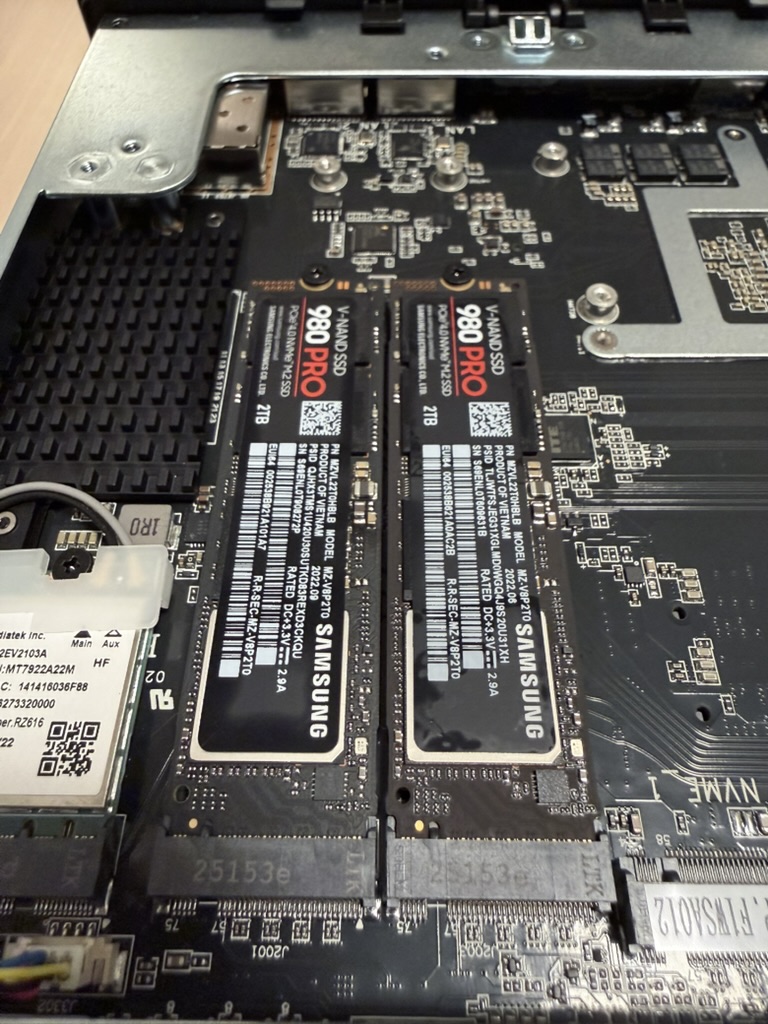
This is the failure that cost me money. I had two Gen5-class NVMe drives in the machine, mirrored as RAID 1, and the mirror is the only reason this story has a happy ending. The M.2 link on the MS-A2 tops out at PCIe 4.0; the BIOS lets you set each NVMe lane from Gen1 to Gen4, and the secondary slots default to Gen3. But the drives are Gen5 parts, and Gen5 controllers run hot whatever link they end up on. In that packed little case, with no thermal alarm set on my end, one of them overheated and died. The array was mirrored, so I lost nothing. If you put hot NVMe in this box, do the same.
The part that took me a while to work out is the real lesson. There’s a fan directly above the M.2 drives. In the BIOS it’s called System Fan, and physically it’s the NVMe fan. As far as I can tell it doesn’t read the NVMe drives at all. When mine cooked, that fan never spun up to meet it, which tells me its curve is tied to some other sensor, not the SSD temperature. So a drive can climb to its thermal limit while the fan sitting right on top of it ticks over to something unrelated. That mismatch is what kills drives in here, more than the density itself.
One bit of confusion worth clearing up, because it caught me too. In the BIOS, the GPU slot’s lane-speed menu lists a Gen5 option even though the slot is wired as PCIe 4.0 x8. The NVMe lanes only go to Gen4. So you’ll find “Gen5” in this machine, just not on the storage and not actually moving Gen5 data. Dropping the NVMe links to Gen3 cut drive temperatures at the obvious cost of speed. You bought fast storage and now you’re throttling it to keep it alive.
There’s also genuine inconsistency in how the slots are documented, and not just from Minisforum. Hostbor calls all three M.2 slots Gen4 (an upgrade over the MS-01, which ran its secondaries at Gen3), SDN-Warrior’s spec table lists all three as Gen3, and Minisforum’s own homelab post splits the difference at two Gen4 and one Gen3. The BIOS exposes per-slot Gen1–4 control regardless, so treat the secondary slots as Gen3 by default and set them where you need them.
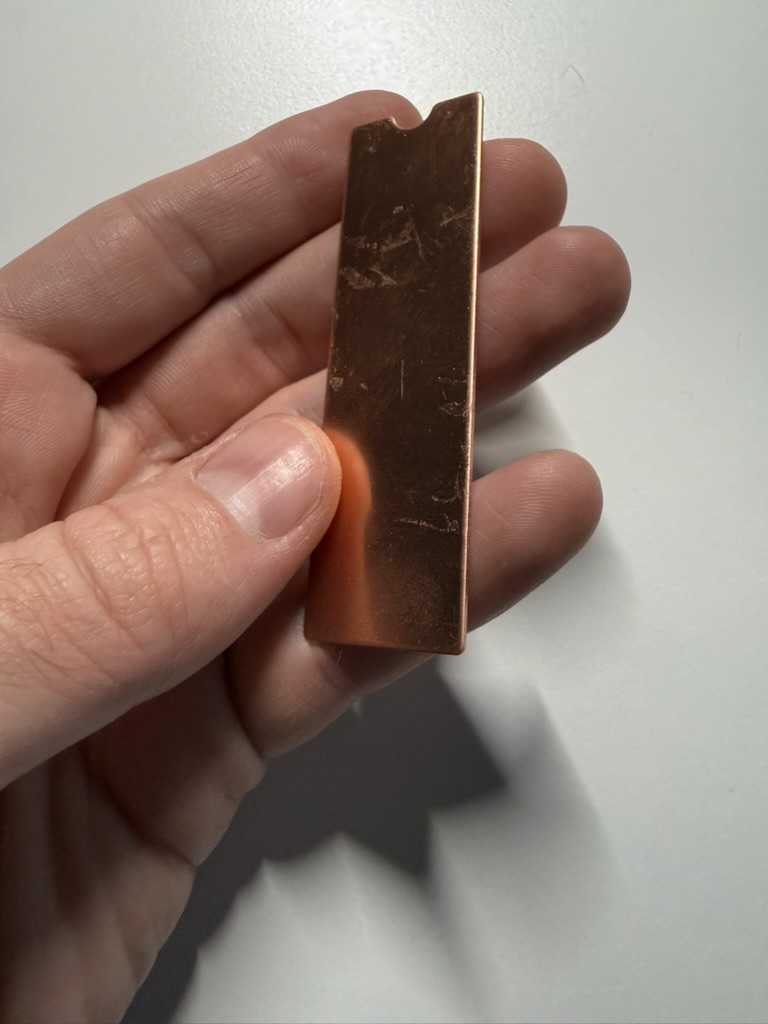
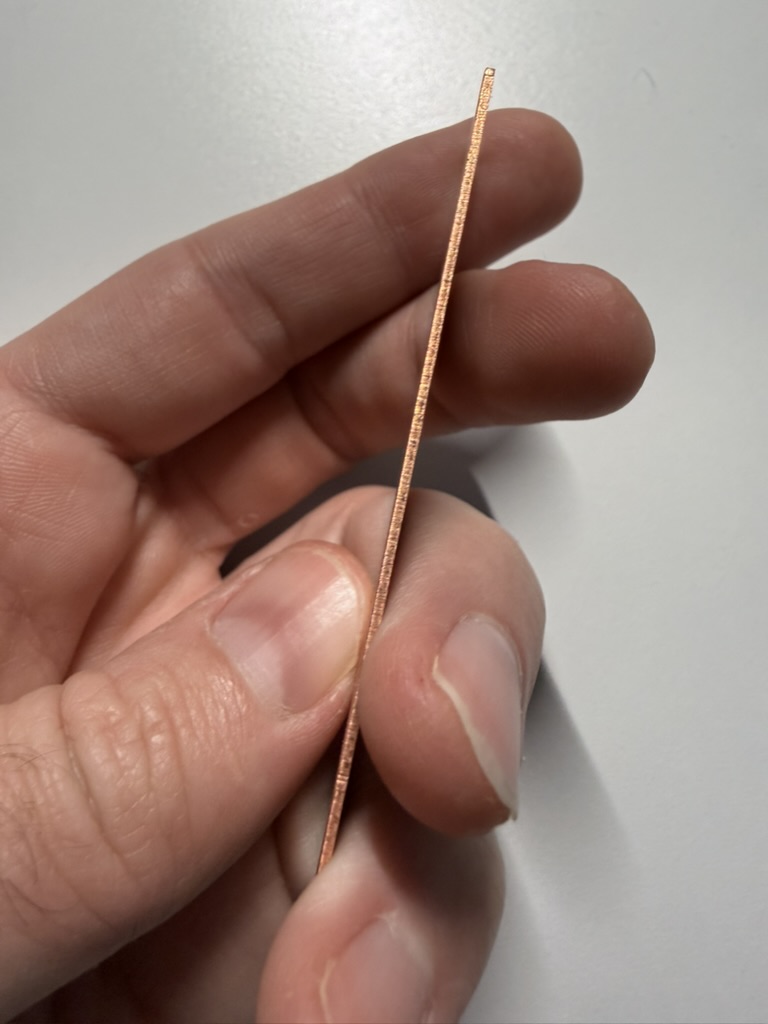
What actually fixed the heat wasn’t the BIOS, it was cooling the drives properly, and the obstacle there is clearance. There’s barely any height under that fan plate for a normal M.2 heatsink. It’s a known weak spot, too: owners have flagged that the slots aren’t spaced for thick double-sided drives or the newer 8 TB NVMe, which want a couple more millimetres than Minisforum left them. So I went deliberately thin: cheap slim M.2 heatsinks off Temu, bonded straight to the drives with Thermal Grizzly putty to keep the stack low, then the plate holding the NVMe fan lifted on three rubber O-rings as spacers, just enough to clear the heatsinks. After that the drives peaked around 70°C under sustained load at 24°C ambient, which is fine. It’s a bodge, but it’s the first thing I’d do next time, before putting any data on the machine.
If you take one practical thing from this review, it’s this: set up NVMe temperature monitoring and a thermal shutdown before you trust this machine with data, and don’t assume the on-board fan is watching the drives. I learned that the expensive way.
The thermal story, part two: the CPU runs hot, and there’s a known fix stack
A 16-core desktop chip in under 1.8 liters is going to be thermally constrained, so none of this is a shock. Mine ran hot enough to throttle on a sustained load, and the reviewers put numbers on the same thing: NoobFeed saw the CPU around 90°C and throttling, Hostbor logged 81°C average and 92°C max under a gaming load, and Notebookcheck’s verdict lines up with what I got, that the case stays cool to the touch while the chip throttles under prolonged load. There’s a broad sense in the community that Minisforum’s stock settings chase benchmark numbers at the expense of longevity.
I went at it from three directions. First the BIOS: I lowered TjMax, which sits under Advanced → AMD CBS, from the default to 78°C, and I spent time on per-core PBO, pulling the curve back on the cores that ran hottest. The TjMax trick was worked out by Chris West, whose wiki page is the reference, on a 9955HX, and William Lam confirmed it applies to the Zen 4 7945HX too on his VMware Cloud Foundation box. Worth knowing: even after Minisforum’s firmware 1.0.2 added fan control, Lam found the machine still ran too hot, and TjMax was what actually fixed it. Don’t expect fan curves alone to do the job.
Then the paste. I replaced the stock interface material with Honeywell PTM7950, the phase-change pad the small-form-factor crowd has settled on, and my load temperatures fell from about 95°C to 85°C. The factory application is mediocre, so if you’re happy opening it up, repasting is close to mandatory. I’m not an outlier here either; there’s a Proxmox forum thread from someone running nearly my setup, down to a delidded chip, a top-tier pad, and an extra fan aimed at it in a server room.
For what it’s worth, the fix Minisforum actually left on the table is the heatsink. The stock cooler relies on heat pipes, and after everything I threw at the problem, I suspect a proper vapor-chamber cold plate over the CPU would have done more for sustained temperatures than any paste or curve I tried. That’s the upgrade I’d want on a revision.
The thermal story, part three: dual SFP+ makes the whole box toasty
This one caught me out until I found other people hitting the same wall. Running both 10GbE SFP+ ports at once turned the whole case into a warm brick. The X710 controller and the SFP+ cages sit in the airflow path, and lighting both up dumps real heat into an interior that’s already saturated.
I’m not the only one. ServeTheHome tested high-power NICs in the MS-01/MS-A2 PCIe slot and found cards like a ConnectX-5 overheating and shutting down without dedicated airflow; their fix was to sit a USB fan on top of the case. The blogger at Mac Does Stuff, running the same two-NVMe, dual-SFP+ layout I had, hit overheating specifically with copper SFP+-to-RJ45 adapters and switched to fiber to stay stable. That matches what I saw exactly. Fiber transceivers run much cooler than the copper RJ45 ones, and in a case this tight that’s the difference between fine and toasty. If you plan to saturate both ports, use fiber and add airflow.
Quirks, bugs, and gotchas nobody warns you about
This is the section I wish someone had handed me before I bought. None of it is a dealbreaker on its own, but together it’s the gap between a smooth setup and a lost weekend.
Memory training will convince you it’s dead. When you install new RAM, the box can sit with a black screen and the fans running for a few minutes while it trains. ServeTheHome warns that most people give up around the two- or three-minute mark, sure the thing is broken; the advice is to wait it out. They also got a 128 GB kit (2× 64 GB) working despite the official 96 GB limit, so the real ceiling is higher than the spec sheet says. Just be patient on that first boot.
The Intel X710 has an upload bug on Linux. Several Proxmox users report the 10GbE X710 giving full download speed but badly crippled upload. One saw upload collapse to a few hundred Mbps, another got around 1.5 Gbps up with constant retransmits, while the Intel i226-V 2.5GbE port on the same machine ran clean. In one case the i40e driver was spitting a repeating ENOSPC error that pinned a core. Networking is a big part of this machine’s pitch, so test your real upload early, and know the Intel 2.5G port is the dependable one out of the box.
Fan control is crude, and one curve whines. Manual fan control only arrived with firmware 1.0.2; before that you had none. It’s still basic: an NVMe-fan curve with a few temperature and PWM points and a handful of CPU modes, nothing like the control an ASUS NUC gives you. There’s a trap in it, too. At certain RPMs the small NVMe fan hits a resonance and lets out a sharp, high-pitched whine, and when you build your own curve you can land right on one of those speeds without meaning to. You end up tuning around the noise as much as the temperature. In performance mode the fans also surge and settle in a repeating wave that I found more annoying than a constant drone, because you keep re-noticing it. There’s no real zero-RPM idle.
AMD iGPU passthrough is a project. If you want to pass the 610M through to a VM, brace yourself. There’s a long Proxmox thread, titled around the author finally getting it stable after months, full of black screens, Code 43, and green-frame artifacts, eventually sorted with community hookscripts from a dedicated Ryzen-passthrough repo. It can be done. It’s months of fiddling, not an afternoon.
Use the Intel 2.5G port, not the Realtek. The two 2.5GbE jacks aren’t the same: one’s an Intel i226-V, the other a Realtek RTL8125. Realtek has never been the favorite under Linux, and on ESXi it’s worse — SDN-Warrior notes there’s no in-box driver for the built-in Realtek NIC at all, so it simply doesn’t show up. On Proxmox or ESXi, default to the Intel ports.
Remember the reset hole. Minisforum’s manual says that if you get stuck, pulling power and holding the recessed reset hole for ten seconds restores BIOS defaults. Given how much BIOS tweaking this machine invites, that’s worth keeping in mind.
Expect to clean it often. Even with the dust mesh, the fans pulled in enough dust that I was blowing them out about every two weeks. The tight fin stacks and small high-RPM fans clog faster than a big tower cooler would, so in a dusty room, or running 24/7, plan on regular compressed-air sessions and expect the noise to creep up as they load.
The noise. Oh, the noise.
This is the one that made me sell it.
The heat, the repaste, the throttling are all trade-offs I can live with. The noise is a lifestyle problem. Under load the MS-A2 is loud, and not in a nice way. NASCompares measured 36–38 dB at light load and 41–43 dB under heavy CPU and network use, and an independent lab hit the same 42–43 dB ceiling, with that surging wave in performance mode. NoobFeed went further, calling the fan noise among the worst it’s tested and pointing out that it makes more idle noise than most.
The reputation gets around; on one deals thread a commenter joked he could already hear the fans just thinking about ordering one. The technical issue is the rise in high-frequency content under load, which is the most tiring sort of noise to sit beside. And on top of the broadband whoosh there’s that separate, sharper whine from the little NVMe fan at certain speeds.
I’ll be fair about the disagreement. A couple of reviewers found it basically silent at idle and thought the noise was justified by the performance. If yours lives in a rack or a closet or a basement, you might land there too. But the line that stuck with me came from a reviewer who otherwise liked it, who said he wouldn’t want it at full load next to his pillow. That’s the whole point.
My reference points are a Mac Studio M3 Ultra and an Nvidia DGX Spark. Both are serious compute, and both are quiet enough to sit an arm’s length from your head and forget about. I’ve slept next to both. The MS-A2 isn’t close. Silent mode, balanced mode, manual curves, undervolting, TjMax, the repaste, I tried all of it, and the answer never changed: this machine wants to be in another room.
The GPU build: a fantastic combo that made everything louder
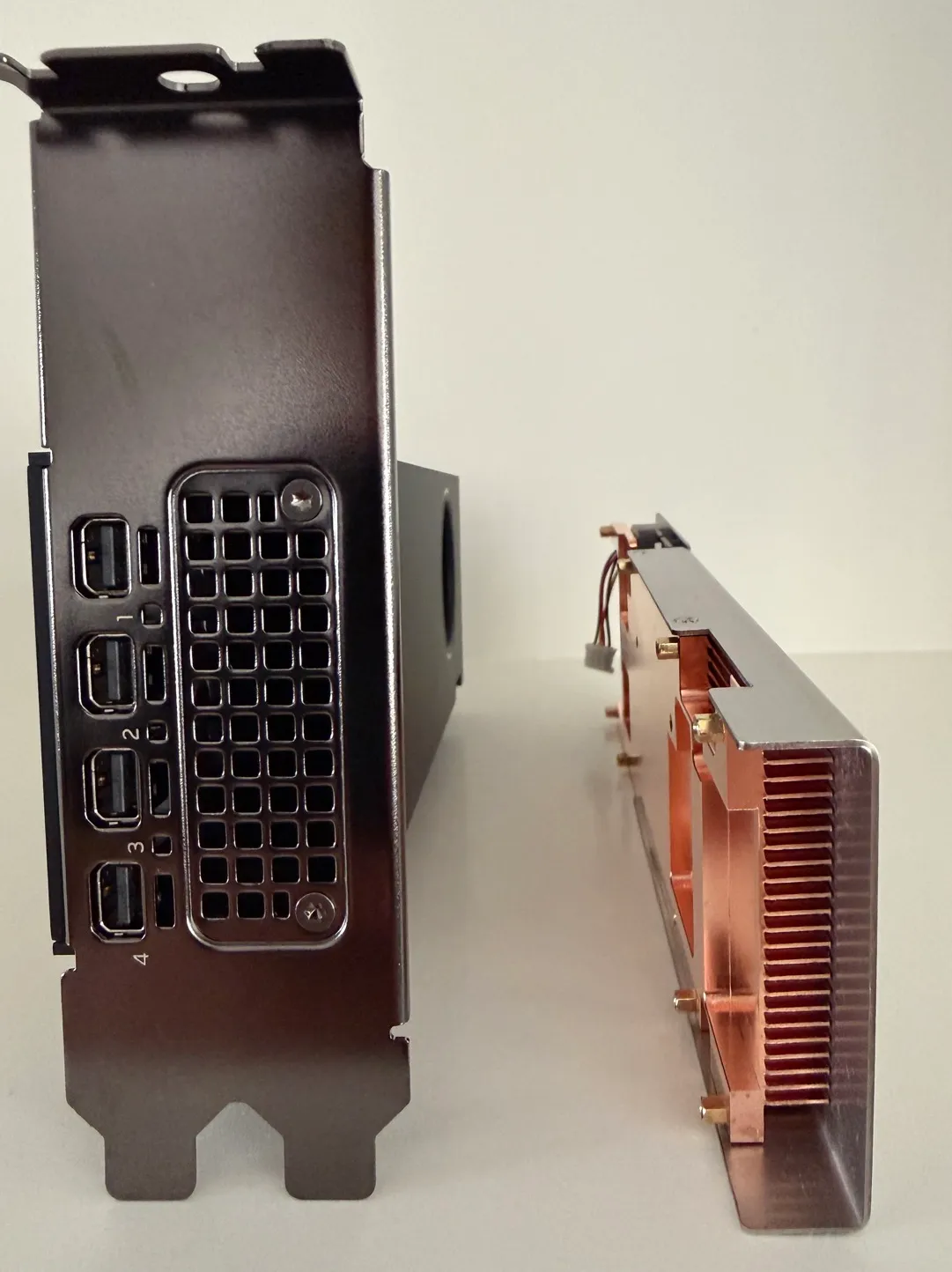
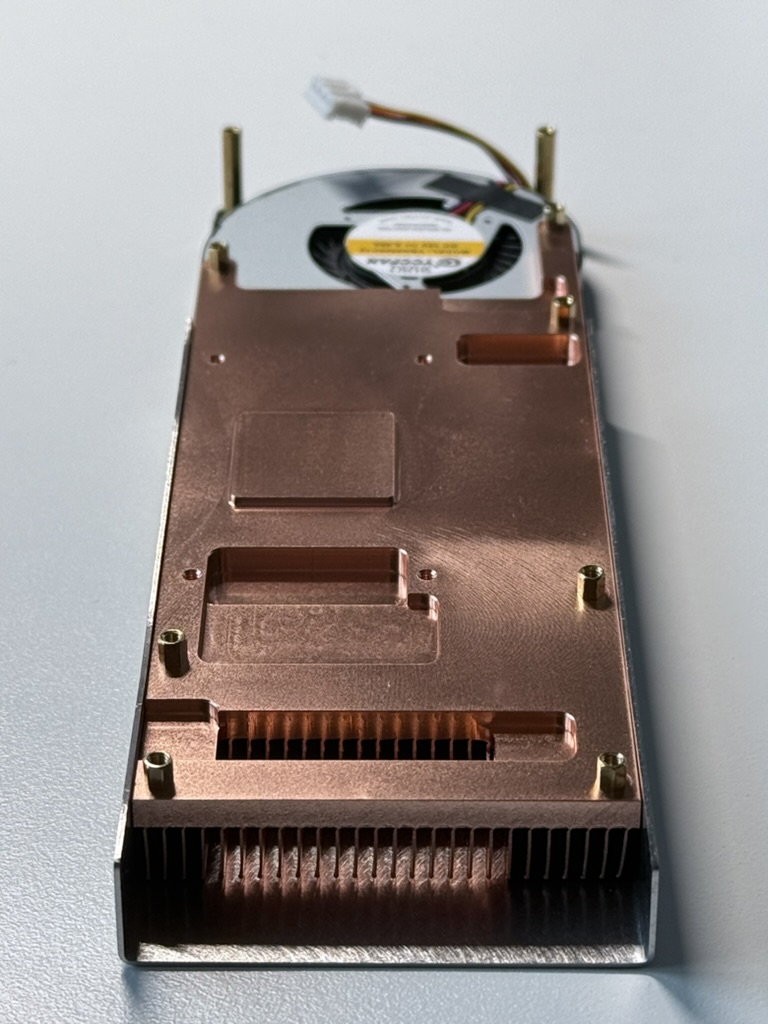
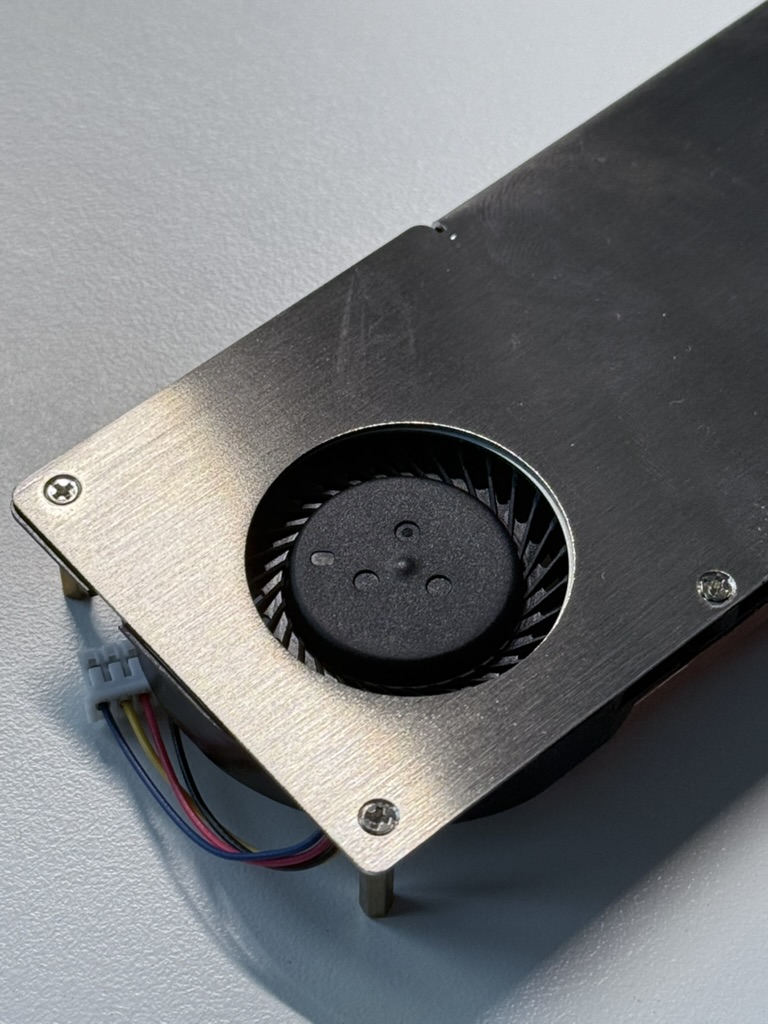
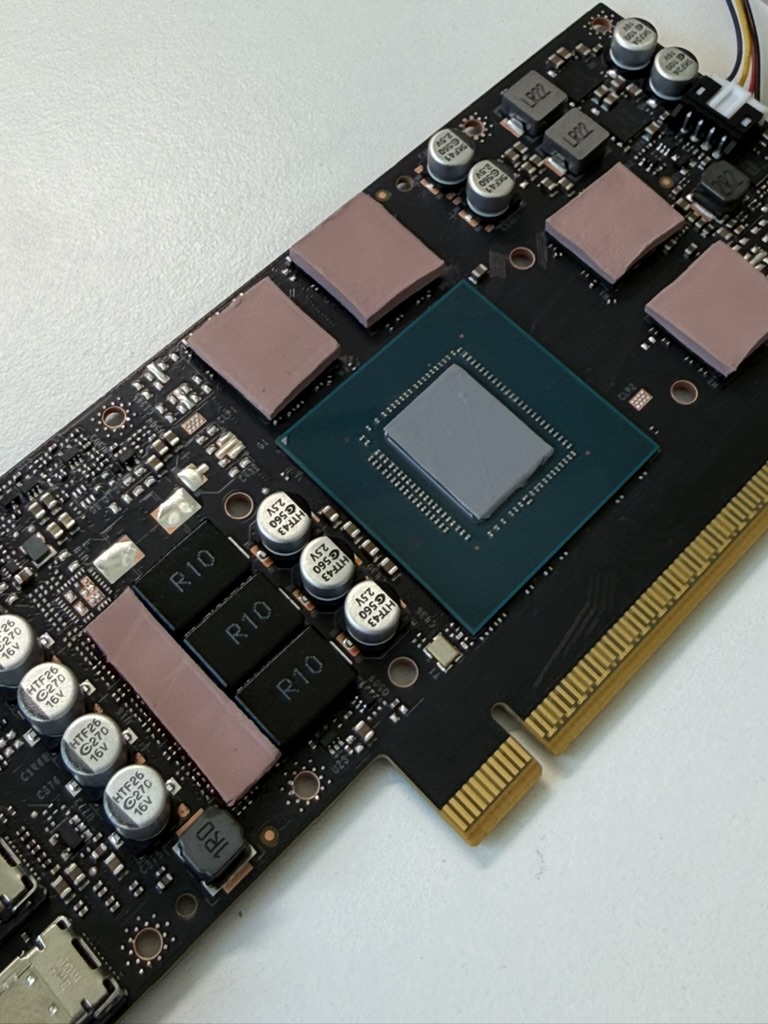
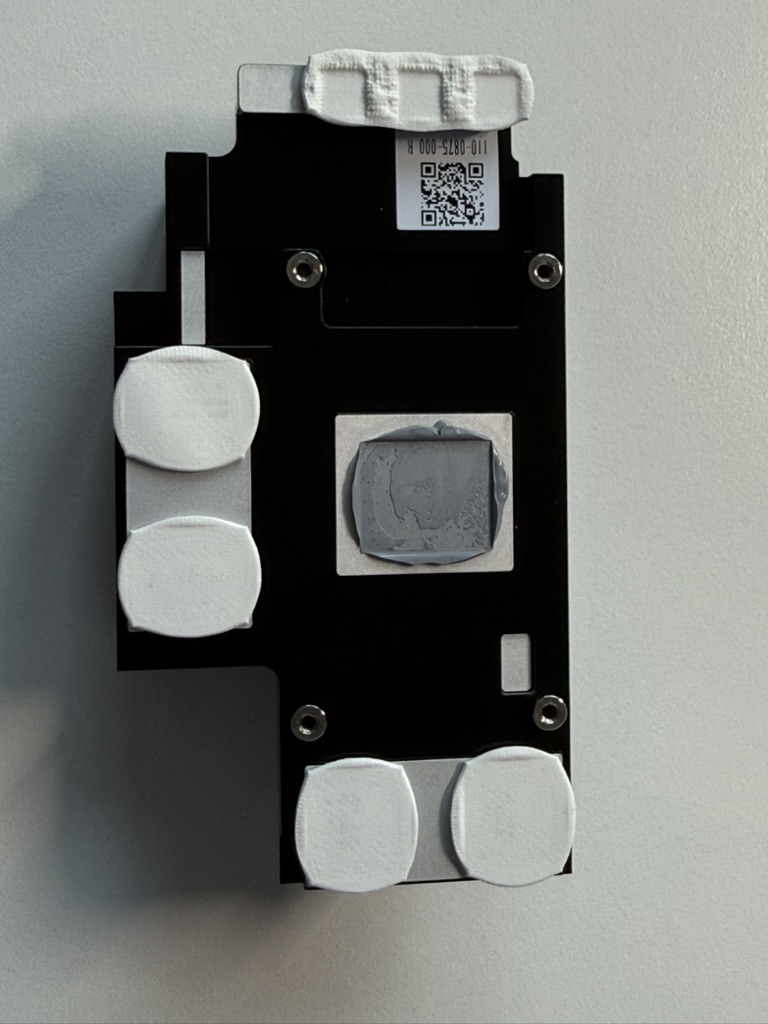
The MS-A2’s trick is that physical PCIe slot, so naturally I used it. I fitted an Nvidia RTX PRO 2000 Blackwell, a 16 GB GDDR7 ECC workstation card, 70 W, slot-powered, 4352 CUDA cores. It’s a dual-slot card, so it doesn’t physically fit. The fix is a single-slot cooler from n3rdware, a Belgian outfit that’s built a small business converting low-profile Nvidia pro cards (the A2000, RTX 2000 Ada, RTX 4000 Ada, and now the Pro 2000 and 4000 Blackwell SFF) to single-slot for exactly this case. It’s a full-copper baseplate and finstack under a steel shroud, and it’s lovely.
I bought the card for a specific job. I run Frigate, an NVR, under Proxmox in a dedicated Ubuntu VM with the GPU passed through, using a local vision-language model to do AI object detection on my camera feeds instead of dumb motion blobs. As a capability it was great; the Blackwell handled the inference easily. The problem was the noise, and it was intermittent. Every time a few cameras tripped detections together, the card’s fan would ramp to meet the load, and in a quiet room that’s exactly the noise you notice. A 24/7 NVR is about the worst workload for this box, because the spike-settle-spike rhythm never lets the fans calm down for long.
My GPU temperatures matched what one other MS-A2 builder reported with the same card: roughly 35–38°C idle and 65–70°C under load. The cooler does its job. Two things I learned tuning it are worth knowing. You can take some heat and noise out in software; nvidia-smi let me cap the card from its 70 W default to 56 W, which softens the fan ramps for a small performance hit, an easy win on an always-on box. And a strange one: idle fan speed was lower before the Nvidia driver loaded than after. From cold boot until the driver takes over the machine is quieter; once the GPU initializes, the baseline fan floor lifts and stays up. If your idle ever gets louder after a driver install, that’s why.
The catch was predictable. Bolting a 70 W heat source and another fan into an already hot, already loud box made it hotter and louder. The GPU is a real capability gain that also took the thermals and the acoustics backward. Nothing’s free in a sealed 1.78 liters.
Looking back, there was a smarter route I skipped. Instead of sealing the card inside, you can run a PCIe riser out of the slot and mount the GPU outside the case, in open air with a normal cooler and its own PSU. Minisforum even provides an OCuLink adapter for an external enclosure, and its DEG1 dock will run cards as large as an RTX 4090 on an external ATX supply. That keeps the card’s heat and noise out of the case entirely. The downsides are real: it defeats the point of a tidy mini PC, an OCuLink dock drops you to PCIe 4.0 x4, and it wouldn’t have solved my main problem anyway, since the CPU fans I was fighting stay inside. But if you only need occasional GPU compute and don’t want more heat in the chassis, putting the card outside is what I’d do next time.
What the MS-A2 + GPU is, and isn’t, good for in AI
I run local AI, which is why the DGX Spark and Mac Studio are in the house, so let me be clear about where this build fits, because it’s easy to buy the wrong thing.
An MS-A2 with an RTX PRO 2000 Blackwell is a strong CUDA workstation and small-model node. Rendering, encoding, image generation, real-time vision inference for an NVR, fine-tuning experiments, and LLM inference up to around 14B in 16 GB of VRAM all run comfortably. What it isn’t is a big-model machine. The moment you want a 70B model locally, 16 GB of VRAM is a wall, and you’re either quantizing it into mush or spilling into system RAM and watching the tokens crawl.
That’s the real decision point, and it’s why the alternatives below matter. For dense small-model and CUDA work, this build is great. For fitting big models in one box, unified-memory machines beat it: a Strix Halo box with 96–128 GB, a Mac Studio, or a DGX Spark will leave a 16 GB card behind, slower per token but able to hold models the little Blackwell can’t.
Living with it as a homelab box
Forget the desk-and-living-room problem for a moment and judge the MS-A2 as pure homelab iron, and it’s strong, with caveats you’ll want to know going in.
The good part: the X710 is a real enterprise NIC, so ESXi and Proxmox see it without a fight, and dual 10GbE plus dual 2.5GbE in 1.78 liters is a layout you can’t normally get this small. People run VMware Cloud Foundation, ESXi, and Proxmox clusters on these without trouble, and the CPU is overkill for virtualization in the best way.
There’s a real bonus for nested labs, too. Because the Zen 5 platform has so much memory bandwidth, VM-to-VM traffic that never leaves the host flies. SDN-Warrior’s nested iperf3 between two VMs hit 86.7 Gbit/s on the MS-A2 against 51.5 on the MS-01, and since that path never touches a physical NIC, it’s really measuring the CPU and memory subsystem. On Proxmox I saw the same kind of headroom.
The caveats live in the setup. On Proxmox specifically, owners report having to pick a ZFS layout instead of EXT4 to install cleanly on some units, and to turn off secure boot. Then there’s the slow memory-training boot, the X710 upload quirk, and the iGPU-passthrough saga. VMware users get one more: NSX Edges won’t start on a Ryzen host until you comment out a DPDK CPU check in the Edge’s config.py, a fix SDN-Warrior documents step by step — Proxmox users dodge that one entirely. None of it is fatal, all of it is real. My take: it’s a great homelab box if you enjoy the tinkering, and a frustrating one if you expected it to just work. The community has the answers now, which wasn’t the case at launch, so you’re buying a better-documented machine than the early adopters did.
What to buy instead (or alongside)
The thing my own first draft left out was what else to buy. Here’s how I’d sort it, depending on what you’re after.
If you’re really after local AI, look hard at the Strix Halo machines: the Framework Desktop, GMKtec EVO-X2, BOSGAME M5, and Minisforum’s own MS-S1 MAX, all on the Ryzen AI Max+ 395 with a strong Radeon 8060S iGPU and up to 128 GB of unified memory. That unified memory holds far bigger models than any 16 GB card, which is the thing that matters most for LLMs. They tend to run quieter and cooler, too; Notebookcheck measured the Framework Desktop at about 144 W in Prime95 against roughly 186 W on the GMK EVO-X2 with the same chip, and quieter with it. The catch is that most lack the MS-A2’s discrete-GPU slot, and some lack 10GbE. For a single-box local-AI machine, though, this is where I’d start.
If you need Thunderbolt, the Intel MS-01 keeps the USB4 and Thunderbolt ports the MS-A2 dropped, which matters for Thunderbolt networking and external GPUs.
If you want a real desktop GPU, step up to the larger MS-02 Ultra. It’s a 4.8L case with a proper PCIe 5.0 x16 slot for full desktop cards, a 350 W power budget, USB4, and 25GbE. Bigger, yes, but it solves the exact heat-and-expansion fight I had cramming a GPU into the MS-A2.
If silence isn’t negotiable, that’s why I kept the Mac Studio M3 Ultra and the DGX Spark. Neither matches the MS-A2 on networking or expandability, but both give you serious compute you can sit beside, which the MS-A2 never managed.
So who is the MS-A2 actually for?
After all of it, the cooked drive, the NVMe heatsink bodge, the TjMax and PBO tuning, the repaste, the SFP+ heat, the GPU mod, the custom case, the networking quirks, my verdict is narrow but real.
The MS-A2 is a superb machine if you have somewhere to put it where you can’t hear it. A server room. A homelab in the garage, the basement, a closet, a rack in a room you don’t sit in. Somewhere a 42 dB surge under load just blends into the background. There, the value is hard to beat: serious 16-core desktop compute, up to 128 GB of RAM, dual 10GbE on a real Intel NIC, PCIe expansion, even a workstation GPU, in something you could mail in a shoebox. For that buyer the noise doesn’t matter and the thermals are manageable with monitoring, a repaste, slim drive heatsinks, and the TjMax mod.
But if the honest answer to “where will this live” is your desk or your living room, buy something else, or accept a machine that announces itself every time you give it work. And if you’re really chasing local AI, weigh a unified-memory box before you commit to this plus a 16 GB card. I keep a Mac Studio M3 Ultra and a DGX Spark because they vanish into the room. The MS-A2 never did, and after months of tinkering, tuning, and quietly resenting the fan noise, I sold it. Not because it’s a bad product, but because it’s the right product for a place I don’t have.
It’s a brilliant little server. It’s a terrible roommate. Know which one you need before you buy.