Quantization is the single most important technique for running large language models outside a datacenter. It is what turns a model that needs eight enterprise GPUs into one that runs on a gaming card, a laptop, or a Mac mini. But the moment you go to download a model, you are confronted with an intimidating wall of cryptic names — Q4_K_M, IQ3_XXS, UD-Q5_K_XL, GPTQ-Int4, AWQ, NF4, EXL3, NVFP4 — with little explanation of what they mean or which one you should pick.
This article is a complete tour of that landscape. It explains what quantization actually does, the small number of underlying ideas that every method is built from, the major formats and algorithms in use today, and a practical framework for choosing among them. It is deliberately model- and hardware-agnostic: the principles apply whether you are running a 1B model on a phone or a 600B mixture-of-experts on a workstation.
What quantization actually is
A neural network is, at heart, a very large pile of numbers — the weights. A model “has 7 billion parameters” means it stores 7 billion of these numbers. By default they are stored in a 16-bit floating-point format, which means each weight occupies 2 bytes, and the whole model occupies roughly parameters × 2 bytes. A 7B model is about 14 GB; a 70B model is about 140 GB.
Quantization reduces the number of bits used to store each weight. Instead of 16 bits, you use 8, or 4, or even 2. The model shrinks proportionally: the same 70B model at 4 bits is roughly 35 GB instead of 140 GB. That is the entire value proposition — smaller files, less memory, and (usually) faster generation, because the main bottleneck in token generation is moving weights from memory to the compute units, and fewer bits means fewer bytes to move.
The catch is that you cannot represent a precise 16-bit number using only 4 bits without losing information. Quantization is therefore lossy compression applied to a model’s weights. The whole art of the field is losing as little quality as possible for a given reduction in size.
How the mapping works
The basic mechanism is simple. Within a group of weights, you find the range of values and map that range onto a small set of integer levels. With b bits you get 2^b levels: 256 for 8-bit, 16 for 4-bit, 4 for 2-bit. Each original weight is rounded to the nearest level. To recover an approximate value later, you store a scale (and often a zero-point offset) per group:
quantized   q = round(w / scale) + zero_point
dequantized w ≈ scale × (q − zero_point)
The scale stretches the small integer grid to cover the real range of the weights; the zero-point shifts it so that zero is representable. These extra numbers (scale and zero-point) are stored alongside the quantized weights and add a little overhead — which is why a “4-bit” model is rarely exactly 4 bits per weight; it is usually 4.5 to 5 once you count the metadata.
Why it works at all
It seems surprising that you can throw away three-quarters of the information in a model’s weights and still get coherent text. The reason is that large models are heavily over-parameterized and redundant. No single weight is critical; the signal is spread across millions of them, and the network is robust to small perturbations of any individual value. Rounding errors that look large per-weight tend to average out across a layer. Modern methods push this much further by being clever about which errors to tolerate and which to avoid — the subject of most of this article.
Bits per weight is the master variable
If you remember one thing, make it this: bits per weight (bpw) is the dominant lever. It sets the file size almost directly, and it is the primary predictor of quality. Everything else — the specific algorithm, the format, the clever tricks — is about getting the best possible quality at a given bpw. A good 4-bit method and a bad 4-bit method produce files of nearly the same size; the difference is entirely in how much quality survives.
Number formats: the raw materials
Before the algorithms, it helps to know the data types they target. These are the “buckets” individual numbers get stored in.
| Format | Bits | Structure | Notes |
|---|---|---|---|
| FP32 | 32 | 1 sign, 8 exponent, 23 mantissa | Full precision. Training reference; rarely used for inference. |
| FP16 | 16 | 1 / 5 / 10 | Half precision. Good mantissa, narrow exponent range (can overflow). |
| BF16 | 16 | 1 / 8 / 7 | Same exponent range as FP32, fewer mantissa bits. The de-facto standard for modern model weights. |
| FP8 (E4M3) | 8 | 1 / 4 / 3 | More precision, less range. Common for weights/activations on recent GPUs. |
| FP8 (E5M2) | 8 | 1 / 5 / 2 | More range, less precision. Used where dynamic range matters (e.g. gradients). |
| INT8 | 8 | integer + scale | The classic 8-bit target. Near-lossless for LLM weights. |
| FP6 / MXFP6 | 6 | 1 / 3 / 2 (block-scaled) | A middle ground between 8 and 4 bit, gaining traction. |
| INT4 | 4 | integer + scale | The classic 4-bit target for GPTQ/AWQ. |
| NF4 | 4 | “NormalFloat” | 4-bit levels spaced to match a normal distribution of weights; used by QLoRA. |
| MXFP4 | ~4.25 | E2M1 + shared E8M0 scale per 32 elements | Open OCP “microscaling” standard; multi-vendor (AMD, Intel, NVIDIA, etc.). |
| NVFP4 | ~4.5 | E2M1 + FP8 (E4M3) scale per 16 elements, plus a per-tensor FP32 scale | NVIDIA’s Blackwell-specific FP4; finer blocks and a richer scale than MXFP4, so more accurate. |
A few things worth understanding from this table:
FP16 vs BF16. Both are 16-bit, but they split the bits differently. BF16 keeps FP32’s full exponent range (8 bits) at the cost of mantissa precision. This makes it far more numerically stable for training, which is why nearly all modern models ship in BF16. For quantization purposes, treat BF16 as the near-lossless “original” the smaller formats are compressed from.
Floating-point vs integer at low bit-widths. At 8 bits, integer (INT8) is usually fine. At 4 bits, things get interesting: a plain INT4 grid wastes precision because weights cluster near zero. NF4 fixes this by spacing its 16 levels according to a normal distribution, putting more levels where the weights actually are. The FP4 formats (MXFP4, NVFP4) take yet another approach.
Microscaling (MX) and NVFP4. The newest low-precision formats are block-scaled: instead of one scale for a whole tensor, a small block of elements (16 or 32) shares a tiny scale factor. MXFP4 is the open standard — 32-element blocks with a power-of-two (E8M0) scale — backed by a multi-vendor consortium. NVFP4 is NVIDIA’s variant introduced with the Blackwell architecture: 16-element blocks with a more precise FP8 (E4M3) scale plus an outer FP32 scale. The smaller blocks and richer scale let NVFP4 track outliers better, so it typically lands at higher quality, at the cost of slightly more overhead (~4.5 bpw vs ~4.25 for MXFP4). The crucial practical point: FP4 needs dedicated hardware. Blackwell GPUs have FP4 tensor cores; older NVIDIA cards (A100, H100) do not, so on those you use INT4 methods (GPTQ/AWQ) instead.
The dimensions of a quantization scheme
Almost every quantization method can be described by where it lands on a handful of independent axes. Once you internalize these, the zoo of method names becomes a small combinatorial space rather than an endless list.
Weight-only vs weight-and-activation. You can quantize just the stored weights (and dequantize them to a higher precision before the math), or you can also quantize the activations — the intermediate values that flow through the network at runtime. Weight-only quantization (notation like W4A16: 4-bit weights, 16-bit activations) is the common case for local inference; it shrinks the model and is robust. Weight-and-activation quantization (e.g. W8A8) is harder because activations contain large outliers, but it unlocks faster integer/low-precision matrix math, which matters for high-throughput serving.
Granularity. A scale can be shared per-tensor (one scale for an entire weight matrix — coarse, cheap, lossy), per-channel (one per row/column), or per-group / per-block (one for every group of, say, 32, 64, or 128 weights — fine-grained, higher quality, more overhead). Finer granularity buys accuracy at the cost of more metadata. This is why you see “group size 128” in GPTQ/AWQ configs, and why the block-scaled FP4 formats exist.
Symmetric vs asymmetric. Symmetric quantization assumes the value range is centered on zero and skips the zero-point; asymmetric (affine) quantization stores a zero-point to handle skewed ranges. Asymmetric is more accurate for distributions that aren’t centered, at the cost of one extra number per group.
Static vs dynamic. Static quantization computes activation scales ahead of time using calibration data and bakes them in. Dynamic quantization computes them on the fly at runtime. Static is faster at inference; dynamic adapts better to unusual inputs. (For weight-only methods this axis is moot — weights are fixed.)
Post-training (PTQ) vs quantization-aware training (QAT). PTQ takes an already-trained model and compresses it — fast, cheap, no retraining, and what almost everyone uses. QAT simulates quantization during training or fine-tuning so the model learns to be robust to it — more expensive, but it can reach lower bit-widths with less quality loss. Most named formats are PTQ; QAT shows up mainly in extreme low-bit research and in models that are designed from the start to be low-precision.
Data-free vs calibration-based. The simplest PTQ is round-to-nearest (RTN): just round every weight, no data required. Better methods are data-aware: they run a small calibration dataset through the model to learn which weights and channels matter most, then allocate precision accordingly. Calibration improves quality, especially below 4 bits, but introduces a dependency on the calibration data (a poorly chosen calibration set can bias the model toward that data’s domain).
Uniform vs mixed precision. A scheme can use the same bit-width everywhere, or keep sensitive parts (embeddings, attention layers, certain “outlier” channels, the first and last layers) at higher precision while squeezing the rest. Mixed precision is how methods squeeze the average bpw down without the quality falling off a cliff. The GGUF K-quants and Unsloth’s “Dynamic” quants are built on exactly this idea.
The quality–size–speed triangle
Every choice is a balance of three things: size (does it fit in memory, with room left for context?), quality (how close to the original model’s outputs?), and speed (how fast does it generate tokens?).
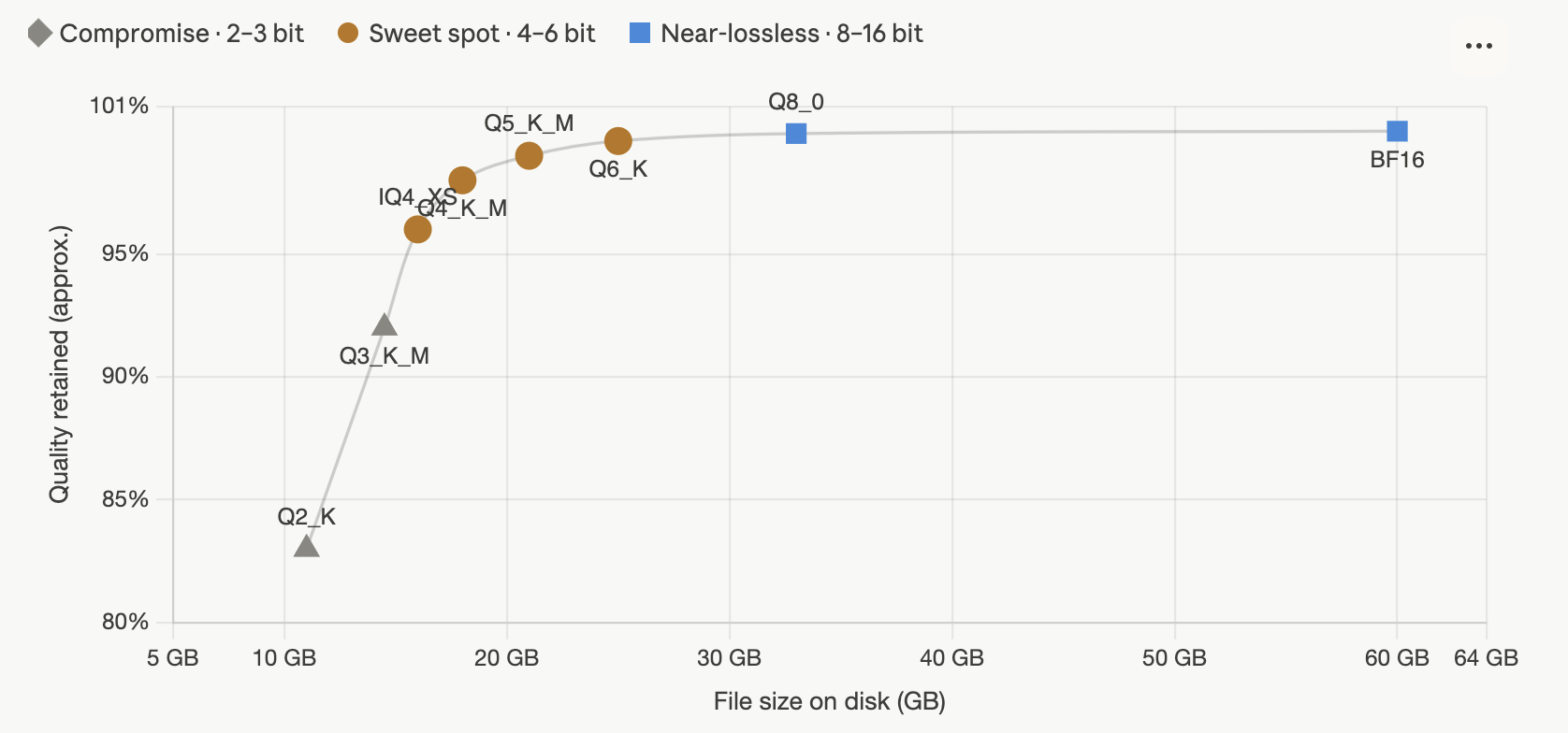
The relationship between bits and quality is not linear. Quality climbs steeply as you add bits at the low end, then flattens into a plateau. There is a characteristic “knee” around 4–5 bits: below it, quality degrades quickly; above it, you are paying a lot of extra gigabytes for a fraction of a percent. This shape is remarkably consistent across models and methods.
The practical reading: for most people, 4-bit (around the knee) is the default, 5–6 bit if you have memory to spare and want insurance, and 8-bit when size is genuinely free. Below 4 bit is a specialist zone you enter only when a model otherwise will not fit. Above 8 bit, you are almost always wasting space.
Smaller is usually faster — but not always. Token generation is typically memory-bandwidth-bound: the speed ceiling is how fast weights can be streamed from memory, so halving the bytes roughly doubles the ceiling. But there are exceptions. The most sophisticated low-bit methods (vector-quantization and i-quant schemes) require more computation to decode each weight, so on compute-limited or poorly-optimized backends they can actually run slower per byte than a simpler higher-bit scheme. And on hardware with native low-precision tensor cores (FP8/FP4), the speedup comes from the compute units, not just bandwidth. Always sanity-check speed on your actual hardware rather than assuming “smaller = faster.”
The mixture-of-experts wrinkle. For MoE models (which activate only a few “expert” sub-networks per token), the size on disk is set by the total parameters, but generation speed depends only on the active parameters that move through memory each token. A 30B-total / 3B-active MoE stores like a 30B model but decodes about as fast as a 3B one. This decouples “how much memory you need” from “how fast it runs,” and it is why large MoE models feel surprisingly snappy even on modest hardware.
Estimating memory
Two numbers determine whether a model fits: the weights and the KV cache.
Weights. Multiply parameters by bytes-per-weight:
| Precision | Bytes/weight | 8B model | 70B model |
|---|---|---|---|
| FP16 / BF16 | 2.0 | ~16 GB | ~140 GB |
| 8-bit | ~1.0 | ~8 GB | ~70 GB |
| 6-bit | ~0.75 | ~6 GB | ~53 GB |
| 5-bit | ~0.65 | ~5.2 GB | ~46 GB |
| 4-bit | ~0.55 | ~4.4 GB | ~39 GB |
| 3-bit | ~0.45 | ~3.6 GB | ~32 GB |
| 2-bit | ~0.30 | ~2.4 GB | ~21 GB |
(These include typical metadata overhead, so they run a bit above the naive bits/8 figure.)
KV cache. As the model generates, it caches key/value vectors for every token in the context. This grows linearly with context length and can become large — for long contexts it sometimes rivals the weights. Its size depends on the model’s architecture (layers, attention dimensions, number of key/value heads) and on the cache precision. Modern attention designs (grouped-query attention, multi-head latent attention) shrink it dramatically, and you can also quantize the cache itself (see below). The rule of thumb: leave headroom on top of the weight size for the KV cache and runtime activations, especially if you plan to use long contexts.
The major methods and formats
Here is where the names live. It helps to distinguish two things that often get conflated: a format/container (how the bits are stored on disk) and a method/algorithm (how the original weights are turned into those bits). GGUF is primarily a container; GPTQ, AWQ, and EXL3 are primarily algorithms whose outputs are stored in the standard Hugging Face safetensors layout. In practice each ecosystem couples a method, a storage format, and a runtime, so people use the names loosely.
The baseline that everything improves on is round-to-nearest (RTN): quantize each weight to its nearest level with no calibration. It is fast and data-free, fine at 8-bit, and serviceable at 4-bit, but it leaves quality on the table at lower bit-widths. Every method below is, in some sense, “RTN plus a trick.”
GGUF (llama.cpp) — the local-inference standard
GGUF is the format used by llama.cpp and everything built on it (Ollama, LM Studio, and many others). It is a single self-contained file that packs the weights, metadata, and tokenizer together, and it runs well on CPUs, GPUs, Apple Silicon, and mixed CPU/GPU setups — which is why it is the most popular format for running models locally. It comes in three generations of quant, plus an increasingly common “dynamic” layer on top. This is the family behind names like Q4_K_M and IQ3_XXS.
Reading the names. A GGUF quant name decodes piece by piece:
- The leading number (the
4inQ4) is roughly the bits per weight — the main lever. Qmeans standard block quantization;IQmeans an “importance-matrix” quant (smarter, lower-bit scheme — see below)._Kmarks a “K-quant” (the modern superblock format). Names without a K (Q4_0,Q4_1,Q8_0) are the older “legacy” quants._S/_M/_Lare Small / Medium / Large variants: at the same bit level, how generously the sensitive tensors are kept._Mis the usual default._XS/_XXSare extra-small variants, seen only on the very low-bit IQ types._NLmeans “non-linear” (a 4-bit IQ variant).- A
UD-prefix and_XLsuffix mark Unsloth’s “Dynamic” quants (below).
Legacy quants (Q4_0, Q4_1, Q5_0, Q5_1, Q8_0) are the original scheme: every block of weights is quantized uniformly. They have been largely superseded on quality, though Q4_0 survives because it has fast, hardware-optimized kernels, and Q8_0 remains a popular near-lossless 8-bit option.
K-quants (Q2_K through Q6_K, with _S/_M/_L sizes) are the workhorse. “Superblocks” let different parts of the model carry different precision, concentrating bits where they matter. Q4_K_M is the single most widely used quant in the ecosystem — the de-facto default 4-bit choice.
I-quants (IQ1_S through IQ4_NL) use an importance matrix (calibration data identifying which weights matter most) together with a more sophisticated codebook borrowed from vector-quantization research. The payoff is better quality per bit, especially at 2–3 bits where an IQ quant can beat the corresponding K-quant. The cost is heavier decode computation, so on CPUs and (historically) Apple’s Metal backend they can run slower per byte; on CUDA they are fine.
The importance matrix (imatrix). Most modern GGUF quants — all the IQ types and the better K-quant releases — are produced with an imatrix: the publisher runs calibration text through the model to weight the quantization toward the activations that actually occur. This meaningfully improves quality at no extra runtime cost, which is why imatrix quants from reputable publishers are generally preferable.
Unsloth Dynamic (UD-…). A refinement on top of K-quants: rather than one bit-width for the whole model, it profiles which layers and experts are most sensitive and keeps those at higher precision while compressing the rest, all imatrix-calibrated. The result is that at a given average size, a UD-Q4_K_XL lands closer to full quality than a plain Q4_K_M. These have become a popular default when available.
GPTQ — the GPU 4-bit classic
GPTQ is a calibration-based, weight-only method (typically W4A16, also 3- and 8-bit). It uses second-order information — an approximation of the Hessian, via the Optimal Brain Quantization framework — to decide how to round each weight so that the output of each layer changes as little as possible, compensating for each rounding error by adjusting the remaining weights. It can quantize very large models in a few GPU-hours and was the first method to make sub-4-bit quantization Pareto-optimal.
Key configuration knobs are group size (e.g. 128, controlling granularity) and act-order / desc_act (quantizing columns in order of importance, which improves quality). GPTQ models run fast on GPUs, especially with optimized kernels like Marlin, and are well supported in serving stacks. Tooling has consolidated around AutoGPTQ and its successor GPTQModel. Use GPTQ when you are serving on NVIDIA GPUs and want a fast, well-understood 4-bit weight-only model.
AWQ — activation-aware weight quantization
AWQ starts from an observation: a small fraction of weight channels (roughly 1%) are salient — they handle the large-magnitude activations and matter disproportionately. AWQ identifies these by looking at activation statistics and protects them (by per-channel scaling) while aggressively quantizing the rest. It is also weight-only (typically 4-bit) and, like GPTQ, calibration-based, but it tends to be more robust to the choice of calibration data and is very fast at inference. AWQ is a leading choice for 4-bit serving on GPUs and is widely supported in inference engines. In practice GPTQ and AWQ are the two dominant INT4 weight-only methods for GPU serving, and they trade blows depending on model and task.
bitsandbytes — on-the-fly quantization and QLoRA
bitsandbytes is the quantization backend wired into Hugging Face Transformers, and its defining trait is convenience: it quantizes a standard model on load, with no separate conversion step or calibration. It offers two main paths. LLM.int8() does 8-bit weight-only inference with special handling for activation outliers (keeping them in 16-bit), and is essentially lossless. NF4 (4-bit NormalFloat), often combined with “double quantization” (quantizing the scales too), is the engine behind QLoRA — the technique that made it possible to fine-tune large models on a single GPU by keeping the base model frozen in 4-bit while training small adapter weights on top. bitsandbytes is the go-to when you want to load any model in 4/8-bit inside the Transformers ecosystem, and especially when you want to fine-tune under tight memory. Its inference throughput is generally lower than GPTQ/AWQ/EXL3, so it is less common for production serving.
SmoothQuant — making W8A8 work
SmoothQuant targets the harder weight-and-activation case (W8A8). The problem with quantizing activations is that they contain large outliers that wreck a naive 8-bit grid. SmoothQuant mathematically migrates that difficulty from the activations into the weights — scaling the two in a compensating way — so that both become easy to quantize to 8-bit. The payoff is full INT8 matmuls (both operands quantized), which speeds up compute-bound serving. It is a serving-oriented technique rather than something you reach for to shrink a model for local chat.
EXL2 / EXL3 — the ExLlama formats
The ExLlama project targets fast inference on consumer GPUs and ships its own quantization. EXL2 introduced variable bitrates: you request a target average (say 4.65 bpw) and the quantizer mixes precision across layers to hit it, giving fine control over the size/quality trade-off. EXL3, in ExLlamaV3, is a substantial upgrade based on QTIP (a trellis-coded vector-quantization method from the QuIP# lineage), using Hadamard transforms and trellis encoding optimized for GPU tensor cores. It pushes good quality down to very low bitrates (2–3 bpw becomes genuinely usable) and is fast. EXL formats store in safetensors and are served via TabbyAPI’s OpenAI-compatible endpoint. They are a strong value choice for squeezing large models onto a single high-end GPU, often beating GPTQ/AWQ at the same memory footprint, at the cost of a smaller ecosystem than GGUF.
MLX — Apple Silicon native
MLX is Apple’s array framework for Apple Silicon, with its own quantization (commonly 4-bit and 8-bit group-wise). Because it is built specifically for the unified-memory architecture and Metal, MLX-quantized models frequently generate tokens faster than the equivalent GGUF on the same Mac. If you are on Apple Silicon, MLX is worth trying alongside GGUF; GGUF remains more portable and has a larger model selection, but MLX often wins on raw speed.
HQQ — calibration-free and fast
Half-Quadratic Quantization (HQQ) skips calibration entirely, using a fast robust optimization to quantize weights in seconds to minutes rather than the hours some calibration-based methods need, while staying competitive on quality at 4-bit and below. Its appeal is speed and simplicity of the quantization step (no calibration dataset to curate or worry about biasing), and it integrates with Transformers. It is a good option when you want to quantize a model yourself quickly without a calibration pipeline.
AutoRound — learned rounding
AutoRound (from Intel) treats the rounding decisions themselves as something to optimize, using sign-gradient descent over a few hundred steps to learn whether each weight should round up or down. It often edges out vanilla GPTQ/AWQ on quality at low bit-widths, particularly 2–3 bit, at the cost of a longer quantization process. It is a solid choice when you are producing your own low-bit quants and quality is the priority.
The vector-quantization frontier — QuIP#, QTIP, AQLM, VPTQ
Below 3 bits, scalar methods (which quantize one weight at a time) hit a wall: the grid is simply too coarse. The state of the art at extreme compression is vector quantization (VQ), which quantizes small groups of weights jointly, exploiting correlations between them and a shared codebook.
- QuIP / QuIP# introduced “incoherence processing” — applying random rotations (Hadamard transforms) so that weights and the Hessian become well-conditioned and easier to quantize — combined with a lattice codebook (the E8 lattice) to reach genuinely usable 2-bit models.
- QTIP extends this with trellis-coded quantization in high dimensions, using a procedural codebook that needs no storage. It is the basis for EXL3.
- AQLM (Additive Quantization of Language Models) represents each weight vector as a sum of entries from several learned codebooks, pushing the quality/size Pareto frontier below 3 bits for the first time. The downside is cost: quantizing a large model can take hundreds of GPU-hours.
- VPTQ (Vector Post-Training Quantization) uses second-order optimization with a residual codebook to compress the leftover error, reaching strong sub-2-bit results efficiently.
These methods are where “2-bit that actually works” comes from. They are heavier to produce and sometimes heavier to decode, so they show up mostly when fitting a very large model into very little memory is the whole point.
Rotation-based methods — QuaRot, SpinQuant
A complementary line of work attacks the outlier problem head-on. Activation and weight outliers are what make low-bit quantization hard; rotating the weight space (again with Hadamard or learned orthogonal transforms) spreads those outliers out so that everything quantizes more evenly. QuaRot fuses random Hadamard rotations into the model; SpinQuant learns the rotation matrices for better results. These techniques are often combined with the methods above (GPTQ, VQ schemes) rather than used alone, and they are a big part of why recent low-bit results keep improving.
Native FP8 and FP4 — letting the hardware do it
The methods above mostly target weight-only INT/codebook compression. A parallel track uses the native low-precision floating-point formats that recent GPUs support in hardware. FP8 (E4M3 for weights/activations) is near-lossless and lets both compute and memory shrink; it is widely used in high-throughput serving via vLLM and TensorRT-LLM, and is the standard “free lunch” precision drop on Hopper/Ada/Blackwell GPUs. FP4 (NVFP4 on Blackwell, MXFP4 as the open standard) goes further, using the FP4 tensor cores for a large throughput gain — but, as noted earlier, it requires hardware that has those cores. The serving ecosystem increasingly standardizes these via the compressed-tensors format and the llm-compressor toolkit (used with vLLM), and PyTorch’s native torchao covers similar ground. If your goal is maximum serving throughput on modern NVIDIA hardware, native FP8 (everywhere) and FP4 (on Blackwell) are the path, and they will generally beat a GGUF/INT4 file on the same GPU.
Quantization-aware training and 1-bit LLMs
Everything so far is post-training: take a finished model and compress it. The alternative is to make the model robust to low precision while training it.
QAT simulates quantization in the forward pass during training or fine-tuning, so the model’s weights adapt to the rounding it will face at inference. It is more expensive and requires access to training infrastructure, but it recovers quality that PTQ leaves behind, especially at aggressive bit-widths. Methods like LLM-QAT and EfficientQAT make this tractable for large models.
BitNet and 1.58-bit models are the extreme endpoint. Instead of compressing an existing model, BitNet trains models whose weights are ternary from the start — each weight is one of {−1, 0, +1}, which works out to about 1.58 bits. At this precision the expensive matrix multiplications become mostly additions, promising dramatic efficiency gains. The trade-off is that you cannot convert an existing model this way; the model must be trained (or extensively retrained) as a BitNet from the beginning, and the ecosystem is still maturing. It represents a different bet than PTQ: rather than squeezing a 16-bit model after the fact, design for low precision up front.
KV cache quantization
Quantizing the weights is only half the memory story. For long contexts, the KV cache — the running store of attention keys and values for every token seen so far — can balloon to gigabytes and become the binding constraint. KV cache quantization compresses it independently of the weights, typically to FP8, INT8, or even INT4.
This is a separate knob from weight quantization, and it has its own quality/length trade-off: 8-bit KV cache is usually safe, while 4-bit can degrade quality on long-context tasks (the cache is more sensitive to precision loss than weights). Most serious inference stacks — llama.cpp, vLLM, ExLlamaV3, TensorRT-LLM — expose KV cache quantization, and enabling it is often the difference between fitting a long context and running out of memory. If you work with long documents or large conversations, treat KV cache precision as a first-class decision, not an afterthought.
Measuring quality
How do you know a quant is “good”? Three common measures, in increasing order of usefulness:
Perplexity measures how surprised the model is by a held-out text. It is cheap and ubiquitous, and a quantized model’s perplexity should be very close to the original’s. But low perplexity does not guarantee preserved capabilities — a model can have near-identical perplexity yet be measurably worse at reasoning or coding.
KL divergence against the original model’s output distribution is a stricter and more informative metric: it asks how much the quantized model’s probability distribution over next tokens has drifted from the full-precision model’s. A quant with tiny KL divergence is genuinely behaving like the original. This is the metric the better quantization publishers now report.
Downstream benchmarks (and honest task-specific evaluation) are the final word. The catch is that quantization damage is uneven: it tends to hit hardest on the things models are already weakest at — multi-step math, long-context reasoning, precise code — while leaving casual chat almost untouched. A quant that feels perfect for conversation may quietly lose a few points on a hard reasoning benchmark. The only reliable check is to evaluate on tasks resembling your actual use.
How to choose — a practical guide
The decision is driven by three questions: what hardware and runtime you are using, how much memory you have relative to the model, and what you are optimizing for.
Start from your runtime. This usually dictates the format:
| If you use… | Pick… |
|---|---|
| llama.cpp / Ollama / LM Studio | GGUF |
| Apple Silicon (and want max speed) | MLX (or GGUF for portability) |
| ExLlamaV3 / TabbyAPI | EXL3 (or EXL2) |
| vLLM / TGI / SGLang (serving) | AWQ, GPTQ, FP8, or compressed-tensors (FP4 on Blackwell) |
| Hugging Face Transformers directly | bitsandbytes (easy), or GPTQ/AWQ/HQQ |
| Fine-tuning under tight memory | bitsandbytes NF4 (QLoRA) |
Then pick a bit-width from your memory budget. Compute the weight size at a few bit-widths (table above), add headroom for KV cache and context, and choose the highest bit-width that fits comfortably. Concretely:
- If the model fits easily at 8-bit or higher, there is no reason to go lower — use 8-bit (or even BF16 if it fits) and enjoy near-lossless quality. Quality is free here.
- If 4–6 bit is where it fits, that is the sweet spot. Default to a good 4-bit (
Q4_K_M/UD-Q4_K_XLfor GGUF; 4-bit AWQ or GPTQ for GPU serving), and step up to 5–6 bit if you have the room. - If the model only fits below 4-bit, reach for the methods built for it: the GGUF IQ quants, EXL3, or a VQ method (AQLM/VPTQ). Accept that quality degrades and test carefully. A 2-bit version of a larger model often beats a 4-bit version of a smaller one at the same memory — bigger-but-more-compressed usually wins.
Rules of thumb:
- For local chat, a good 4-bit quant is the right default for almost everyone. Going to 6-bit is cheap insurance against quality loss on hard tasks; going to 8-bit is overkill unless memory is free.
- Avoid sub-4-bit unless you must. The IQ/VQ schemes make it possible, not painless.
- Prefer imatrix/calibrated quants from reputable publishers over raw RTN.
- On NVIDIA Blackwell, native FP4 (NVFP4) is the throughput play; on older NVIDIA cards, INT4 (AWQ/GPTQ) is the equivalent.
- Quantize the smallest models least aggressively — they have the least redundancy to spare, so a 4-bit 1B model degrades more than a 4-bit 70B one.
- Don’t forget the KV cache for long contexts; it may matter more than the weight precision.
Common pitfalls and misconceptions
“More bits is always better.” Only up to a point. Past the ~5–6 bit knee, extra bits buy almost nothing while costing real memory and speed. The skill is picking the lowest bit-width that still meets your quality bar, not the highest you can fit.
Judging a quant by perplexity alone. Perplexity can look fine while reasoning or coding quietly degrades. Evaluate on tasks like your real workload.
Assuming smaller is always faster. Usually true (bandwidth-bound decode), but the fanciest low-bit methods cost extra decode compute, and native low-precision speedups depend on having the right tensor cores. Measure on your hardware.
Ignoring calibration-data bias. Calibration-based methods inherit the flavor of their calibration set. A model calibrated only on, say, English Wikipedia may underperform on code or other languages. Reputable publishers use broad calibration mixes for this reason.
Mismatching format and hardware. FP4 needs Blackwell; some EXL3/QTIP kernels want recent tensor cores; i-quants are slower on CPU/Metal. Match the format to what your runtime and hardware actually accelerate.
Treating MoE size like dense size. An MoE’s memory footprint is set by total parameters but its speed by active parameters. Budget memory for the whole model, but expect speed closer to a much smaller one.
Quick reference
Bit-width cheat sheet:
- 8-bit — near-lossless; use when it fits and you want zero compromise.
- 6-bit — effectively indistinguishable from the original for almost all uses.
- 5-bit — excellent; a small step down from 6 for a bit more savings.
- 4-bit — the sweet spot and sensible default; great quality, big savings.
- 3-bit — usable but noticeably degraded; for when 4-bit won’t fit.
- 2-bit — only with VQ/IQ methods, only when nothing else fits; prefer a bigger model at 2-bit over a smaller one at 4-bit.
Method-to-ecosystem map:
- GGUF (K-quants, IQ-quants, Dynamic) — local inference everywhere; CPU/GPU/Apple/mixed.
- GPTQ / AWQ — INT4 weight-only for GPU serving.
- bitsandbytes (INT8, NF4) — easy Transformers loading; QLoRA fine-tuning.
- EXL2 / EXL3 — fast, variable-bitrate, low-bit on consumer GPUs.
- MLX — Apple Silicon native.
- HQQ / AutoRound — DIY quantization (fast / quality-focused respectively).
- SmoothQuant, FP8, NVFP4/MXFP4 — activation-and-weight and native low-precision for high-throughput serving.
- QuIP#, QTIP, AQLM, VPTQ — research-grade extreme (sub-3-bit) compression.
- QAT / BitNet — train-for-low-precision, including ternary 1.58-bit models.
Quantization has matured from a blunt size-reduction trick into a rich field with a method for nearly every constraint. But the through-line is simple: choose the bit-width that fits your memory with the quality you need, match the format to your hardware and runtime, and remember that the difference between a good quant and a bad one — at the same size — is entirely in how cleverly it spends its bits. Start with a solid 4-bit quant from a reputable source, and step up or down only when your hardware or your quality requirements give you a concrete reason to.