Here are a few steps on how to install GO on @opnsense and @Crowd_Security IPDEX a simple CLI tool to gather insight about a list of IPs or an IP using the CrowdSec CTI (Cyber Threat Intelligence) API.
- Check an IP’s reputation using CTI
- Scan IP or log files and display detailed reports
- Run CrowdSec Search Queries
- Keep a local history of reports for later inspection - All scanned IPs are cached for 48 hours.
Many thanks to the developer for the tool
Download the GO version for freebsd:
fetch https://go.dev/dl/go1.24.3.freebsd-amd64.tar.gz
Install GO using the following command:
sudo tar -C /usr/local -xzf go1.24.3.freebsd-amd64.tar.gz
Using vi or vim, edit ~/.profile
# Set HOME
setenv HOME /root

# Set PATH for Go 1.24.3 and ipdex
setenv PATH "/sbin:/bin:/usr/sbin:/usr/bin:/usr/local/sbin:/usr/local/bin:~/bin:/usr/local/go/bin:~/go/bin"

# Set GOPATH for Go
setenv GOPATH ~/go

# Set TERM
if (! $?TERM) setenv TERM xterm

# Set PAGER
setenv PAGER less

# Query terminal size
if ( -x /usr/bin/resizewin ) /usr/bin/resizewin -z

# Optional: Display fortune
# if ( -x /usr/bin/fortune ) /usr/bin/fortune -s
To run ipdex from anywhere in your terminal, the binary must be in a folder that’s part of your PATH, for example /usr/local/bin
Running go version you should see
root@gw:/usr/local/bin # go version
go version go1.24.3 freebsd/amd64
Download ipdex for your system from the Releases page and make it executable:
sudo fetch -o /usr/local/bin/ipdex https://github.com/crowdsecurity/ipdex/releases/download/v0.0.5/ipdex_linux_amd64
sudo chmod +x /usr/local/bin/ipdex
Alternatively you can use curl:
curl -L -o /usr/local/bin/ipdex https://github.com/crowdsecurity/ipdex/releases/download/v0.0.5/ipdex_linux_amd64
chmod +x /usr/local/bin/ipdex
Create an API key in your Crowdsec account under Settings -> CTI API Keys
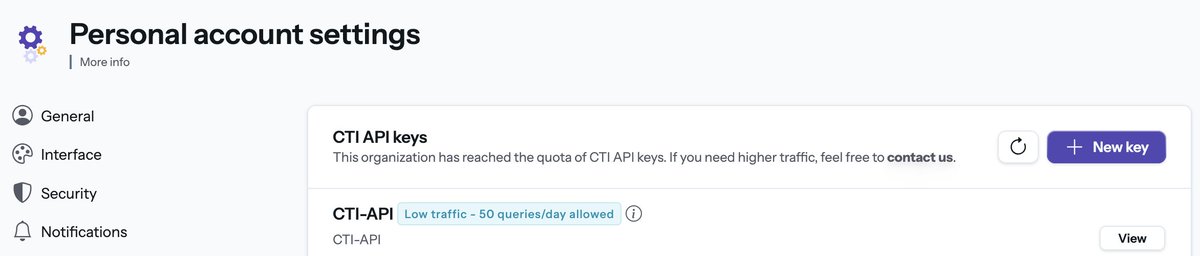
Initialize the tool by running the command ipdex init and provide the newly generated API key.
You can generate an API key in the CrowdSec Console
→ "https://app.crowdsec.net/settings/cti-api-keys"

Enter your API key: YOUR API KEY HERE

✅ API Key saved.

🎉 Congratulations! You've just setup ipdex, you can now scan your first IP or your first file!
→ ipdex 1.2.3.4
→ ipdex ips.txt

When scanning files, ipdex will create a new report
→ ipdex ips.txt  # to scan a file
→ ipdex /var/log/nginx/access.log  # to scan a NGINX access log file

IPs result from CrowdSec CTI API are cached for 48h.
→ ipdex 1.2.3.4 -r  # refresh IP cache
→ ipdex ips.txt -r  # refresh all IPs cache from report

CrowdSec quota for free tier is 30 requests/week
→ Everytime you will scan a file that contains more than 30 IPs, you will get a warning
→ ipdex config set --min-ips-warning 500  # to increase minimum of IPs warning

🎮 ipdex initialized! 🎮
Here is the list of commands available for ipdex
A simple CLI tool to gather insight about a list of IPs or a log file with the CrowdSec CTI.

Examples:
  ipdex init                             # Init ipdex the first time
  ipdex 1.2.3.4                          # Show info for a single IP
  ipdex ips.txt                          # Analyze a file containing a list of IPs
  ipdex /var/log/nginx/access.log        # Analyze log files
  ipdex report list                      # List all reports
  ipdex report show -i 1                 # Inspect a specific report
  ipdex config set --api-key <api-key>   # Set a new CrowdSec CTI API key
  ipdex config show                      # Show current configuration

Usage:
  ipdex [flags]
  ipdex [command]

Available Commands:
  completion  Generate the autocompletion script for the specified shell
  config      Configure
  help        Help about any command
  init        Initialize the configuration
  report      List/Inspect and delete reports
  search      Search CrowdSec CTI IPs from a given lucene query
  version     Display version

Flags:
  -d, --detailed        Show all informations about an IP or a report
  -h, --help            help for ipdex
  -n, --name string     Report name when scanning a file or making a search query
  -o, --output string   Output format: human or json
  -r, --refresh         Force refresh an IP or all the IPs of a report
  -y, --yes             Say automatically yes to the warning about the number of IPs to scan

Use "ipdex [command] --help" for more information about a command.
Here are some examples:
ipdex 205.210.31.250

IP Information

IP                              205.210.31.250
Reputation                      malicious
Confidence                      high
Country                         US 🇺🇸
Autonomous System               GOOGLE-CLOUD-PLATFORM
Reverse DNS                     N/A
Range                           205.210.31.0/24
First Seen                      2023-04-15T01:15:00
Last Seen                       2025-05-16T13:45:00
Console URL                     https://app.crowdsec.net/cti/205.210.31.250
Last Local Refresh              2025-05-16 17:48:30

Threat Information

Behaviors
                                HTTP DoS
                                Exploitation attempt
                                HTTP Scan
                                ... and 2 more

Classifications
                                CrowdSec Community Blocklist

Blocklists
                                CrowdSec Intelligence Blocklist
                                High Background Noise

Target countries
     🇺🇸 US                      31%
     🇩🇪 DE                      21%
     🇫🇷 FR                      15%
                                ... and 2 more
ipdex search "cves:CVE-2025-2748"
 SUCCESS  Fetching complete!

General

Report ID                       1
Report Name                     Pulse-Shadow-Report
Creation Date                   2025-05-16 17:50:20
Query                           cves:CVE-2025-2748
Since Duration                  30d
Since Time                      2025-04-16 17:50:20
Number of IPs                   205
Number of known IPs             205 (100%)

Stats

🌟 Top Reputation
     Known                                                      98 (48%)
     Suspicious                                                 60 (29%)
     Malicious                                                  33 (16%)
     Benign                                                     14 (7%)
     Unknown                                                    0 (0%)

🗂️ Top Classifications
     Spoofed User Agent                                         74 (36%)
     Dangerous Services Exposed                                 26 (13%)
     Many Services Exposed                                      23 (11%)
     Known Security Company: Hadrian.io                         14 (7%)
     Public Internet Scanner                                    14 (7%)

🤖 Top Behaviors
     HTTP Exploit                                               204 (100%)
     HTTP Scan                                                  194 (95%)
     HTTP Bruteforce                                            134 (65%)
     VM Management Exploit                                      73 (36%)
     HTTP Crawl                                                 72 (35%)

⛔ Top Blocklists
     HTTP Exploit Attackers                                     28 (14%)
     Public Internet Scanners                                   14 (7%)
     High Background Noise                                      12 (6%)
     Healthcare Attackers                                       12 (6%)
     IT and Services Attackers                                  11 (5%)

💥 Top CVEs
     CVE-2025-2748                                              205 (100%)
     CVE-2024-4040                                              142 (69%)
     CVE-2021-41773                                             129 (63%)
     CVE-2021-44228                                             121 (59%)
     CVE-2024-3400                                              118 (58%)

🌐 Top IP Ranges
     34.32.0.0/11                                               22 (11%)
     51.15.0.0/16                                               11 (5%)
     18.128.0.0/12                                              7 (3%)
     34.16.0.0/12                                               7 (3%)
     34.104.0.0/13                                              6 (3%)

🛰️ Top Autonomous Systems
     GOOGLE-CLOUD-PLATFORM                                      81 (40%)
     DIGITALOCEAN-ASN                                           37 (18%)
     AMAZON-02                                                  33 (16%)
     Scaleway S.a.s.                                            15 (7%)
     Contabo GmbH                                               11 (5%)

🌎 Top Countries
     US 🇺🇸                                                      79 (39%)
     DE 🇩🇪                                                      36 (18%)
     FR 🇫🇷                                                      21 (10%)
     KR 🇰🇷                                                      17 (8%)
     SG 🇸🇬                                                      15 (7%)

Created report with ID '1'.
View report                    ipdex report show 1
View all IPs in report         ipdex report show 1 -w